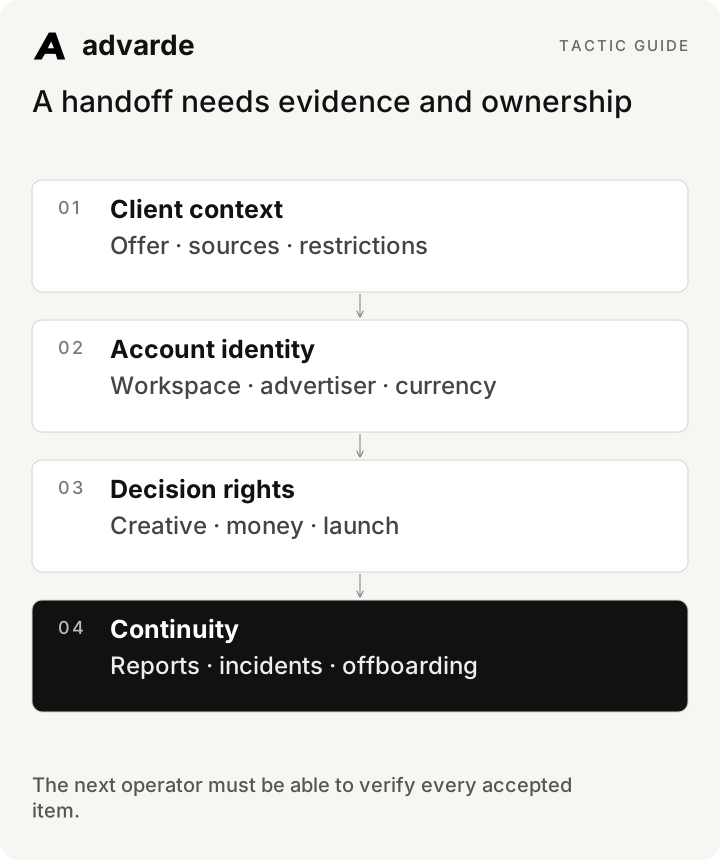
Client onboarding is complete when the next operator can find the correct account, understand the offer, use approved claims, and identify who can authorize a change. A collection of shared documents is only part of that work.
This guide gives an agency a repeatable intake and acceptance process. It covers the first handoff and the eventual offboarding. The example client and responsibilities are fictional; adapt roles to your real engagement.
Jump to a step in this guide
Your finished deliverable
A client workspace ready for a reviewed campaign, with assigned access, evidence, measurement, and approval responsibilities.
- An agreed service scope and a named client sponsor.
- An authorized owner of the advertiser account.
- Client-provided brand material, destinations, and business goals.
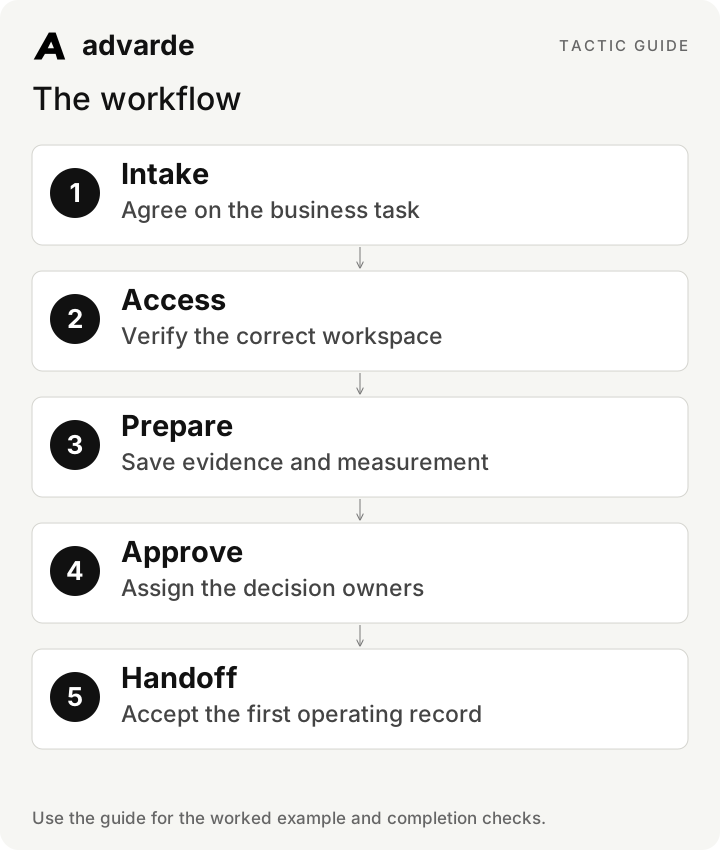
1. Turn the kickoff into an intake record
Ask for the next business action, offer terms, customer situations, supported claims, excluded claims, destination ownership, and the definition of a valuable conversion. Request the source of each factual answer. “Our sales team knows” needs a named contact and follow-up.
Separate a blocker from useful background. Missing brand adjectives should not hold an account access check; an unknown budget owner should hold a spending decision. Give every unresolved item an owner and due date.
| Question | Why it matters | Acceptance evidence |
|---|---|---|
| What is the offer and next action? | Determines copy and destination | Approved brief with exact terms |
| Who owns account access? | Determines valid connection and continuity | Named advertiser owner |
| What counts as a valuable outcome? | Determines measurement and reporting | Written event/business definition |
| Who approves money and creative? | Determines execution authority | Named roles and review process |
| Who can fix the destination? | Determines incident response | Website contact and response route |
2. Verify the workspace before importing context
EARLYBIRD includes one ad account. Separate client workspaces require Advarde enablement and assigned licenses; they are off by default. Contact Advarde to confirm capacity and access before planning this setup. Confirm the connected advertiser identity, currency, and timezone. A familiar campaign name is not enough to establish that the account is correct.
Give people the access their role requires and test it. Viewers should be able to inspect the intended information without being treated as approvers. Owners and admins have different operational responsibilities from an external person who comments on a draft. Store credentials through supported connection flows; do not collect them in the onboarding worksheet.
3. Build a concise client context pack
Save a brand profile, one initial campaign brief, approved evidence, restrictions, and useful destination references in Advarde’s library. Prefer a maintained source over many inconsistent copies. Include revision dates so the next draft uses current terms.
For fictional Northstar, the pack includes its walkthrough offer, CSV import documentation, tone examples, destination owner, and a restriction against revenue guarantees. The first campaign brief refers to those records rather than copying an untraceable collection of claims.
Review the client-supplied materials [sources].
Prepare an intake summary with offer, customer situations, approved facts,
restricted claims, destinations, primary action, and source references.
List contradictions and missing decisions with proposed owners.
Do not invent pricing, outcomes, or approvals.
Prepare the context pack for review before saving approved claims.A handoff needs evidence and ownership
4. Agree on measurement before the first report
Document the event, source system, reporting timezone, attribution basis, and any quality definition supplied by the client. A lead form submission and a qualified opportunity are different outcomes. Do not present one as the other.
Assign both a measurement implementation owner and a person who interprets the business outcome. Verify the initial event path and preserve open issues. If measurement is not ready, state what a traffic-only report can support and which decisions must wait.
5. Write the approval responsibilities
A client’s comment on copy is useful evidence of feedback, but operational authorization must follow the reviewed change workflow and current account permissions. Record who prepares, reviews, approves, and handles an incident.
Set an escalation route for unavailable approvers. Silence is not approval, and a missed deadline should not silently expand the agency’s authority. A new budget, destination, or creative revision can require a fresh review.
| Work | Prepares | Decides / authorizes | Completion record |
|---|---|---|---|
| Offer and factual claims | Agency strategist | Client subject owner | Approved context revision |
| Creative proposal | Agency creative lead | Named creative reviewer | Exact reviewed copy |
| Campaign spend/configuration | Campaign operator | Authorized budget/account approver | Reviewed change |
| Measurement fix | Developer | Measurement/site owner | Verification record |
| Live delivery incident | Operator | Authorized account owner under agreed scope | Action and observed status |
6. Accept one complete first campaign packet
Run the first draft through the full workflow before scaling the operating model across more campaigns. Confirm that the team can find the draft, inspect the review, follow paused creation, and distinguish activation from delivery.
Use an acceptance gate: correct account confirmed, claims approved, destination checked, measurement documented, money and dates decided, reviewer available, and next report owned. An unresolved item should be assigned and either explicitly accepted as a limitation or treated as a blocker.
Audit this client handoff [records].
For each acceptance item return pass, blocker, or accepted limitation.
Cite the record that supports the status. Assign missing evidence to a named role.
Check account identity, claim approval, destination, measurement,
budget authority, exact draft revision, launch conditions, and first report owner.
Do not treat document completion as permission to spend.7. Plan ownership changes and offboarding now
Record who owns report schedules, assistant connections, and automation policies. A departing user’s permissions or entitlement may affect scheduled work. Transfer responsibility through supported configuration and verify the replacement before relying on it.
At offboarding, revoke access and tokens through the relevant systems, pause unwanted schedules and policies, and confirm who controls live advertising. Stopping automation or removing an assistant does not automatically pause ads already delivering. Make that distinction explicit in the final client handoff.
Complete the worksheet and check your work
Download the free pack and complete the three editable worksheets in order. It includes this illustrated guide and its worked-example tables so you can use the material offline. Replace the fields with your own verified inputs. The prompts work with supplied material; reading or saving Advarde records requires a compatible authorized connection.
- The client and advertiser identities are verified.
- The initial offer and claims have approved sources.
- The measurement definition and owner are recorded.
- Creative and budget approval responsibilities are explicit.
- The first campaign packet has passed its acceptance check.
- Schedule ownership and offboarding responsibilities are documented.
| Worksheet | Use it for |
|---|---|
| Client intake and blockers | client-intake.md |
| Client decision responsibilities | approval-responsibilities.md |
| First campaign acceptance and continuity | client-acceptance.md |
Put this tactic to work in Advarde
Create an Advarde workspace to keep the relevant campaign context, reviewed work, and team records together. Use a connected assistant when it helps you draft or inspect the information. Start with the completed worksheet and the exact account and task you intend to manage. The guide and downloads are free; Advarde subscriptions, assistant access, and advertising spend are separate.
Common questions
Can I use the guide without an Advarde account?
Yes. The illustrated guide, examples, prompts, and editable worksheets are available without signup or an email gate. An Advarde account and appropriate access are needed to carry out the product-specific steps.
Does a prompt or worksheet authorize live changes?
No. Planning and analysis prompts prepare work for review. Changes to advertising follow the applicable account permissions and reviewed authorization. Use the actual connected tools and current account capabilities.