Connect Claude to Advarde to read ChatGPT Ads performance and prepare campaigns in the same workspace your team uses in the browser. This walkthrough takes you from the connection URL to a first report and a saved campaign draft. You can complete the walkthrough without creating or activating advertising.
The tool workflow was rehearsed on 13 September 2026 with an isolated Advarde workspace and simulated advertiser responses. The examples and screenshots below use synthetic data. This verifies Advarde's account, report and draft behavior; it does not establish a successful connection from a hosted Claude account or access to a live advertiser.
Before you connect
You need an Advarde workspace and an eligible OpenAI advertiser account that you are authorized to access. Connect that advertiser in Advarde first. A ChatGPT subscription or a model API key does not supply advertiser access.
Anthropic currently supports custom remote MCP connectors on Free, Pro, Max, Team and Enterprise, with one custom connector on Free. Team and Enterprise require an organization owner to add the connector. See the linked instructions for current availability.
- Confirm the advertiser ID, currency and timezone in Ad accounts. Use the intended client workspace.
- Read-only access is sufficient for account inspection and raw insights. Saving a report or draft requires workspace write access; saving either does not create advertising.
- For the draft example, have approved copy, an image, a destination URL, a budget and an explicit location selection ready.
1. Add Advarde to Claude
In Advarde, open MCP connections and copy the displayed /mcp server URL. Use this deployment's URL exactly; the public guide URL is not the MCP endpoint.
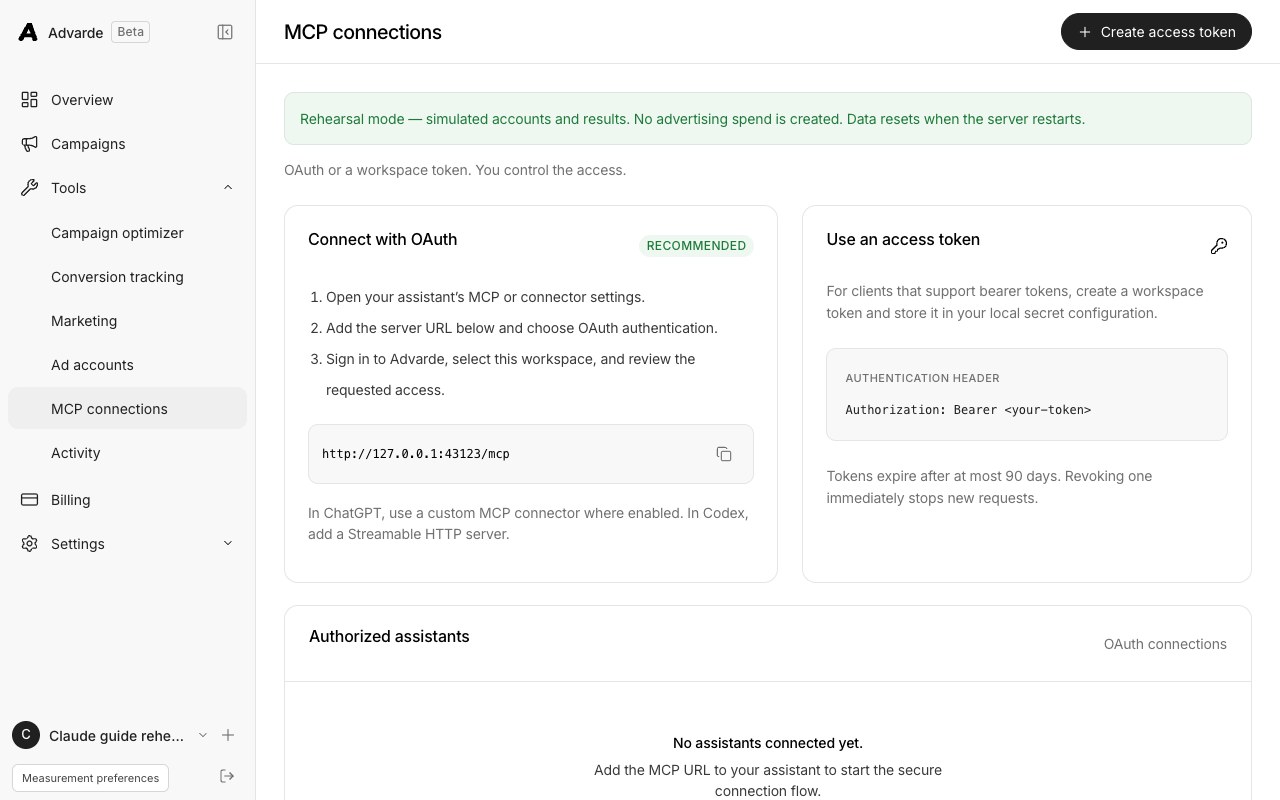
- In Claude, open Customize → Connectors → + → Add custom connector. For Team or Enterprise, an owner first uses Organization settings → Connectors → Add → Custom → Web.
- Name the connector Advarde and enter the copied server URL. Add it, then choose Connect to start authentication.
- Sign in to Advarde, select the intended workspace and review the requested access. Complete authorization and return to Claude.
- In the conversation, use + → Connectors to enable Advarde. Start with the account-check prompt below.
2. Confirm the account before reading performance
Ask Claude to run ads_list_accounts, choose the intended connection, then run ads_get_ad_account with its account_id. These are different checks: the list identifies workspace connections; the account read verifies the upstream advertiser can actually be reached.
The account_id is Advarde's connection UUID. The external_id is the upstream advertiser ID. Use the connection UUID as account_id in later tools. Check that the account read returns the matching advertiser ID, currency and timezone. Do not select an account by a similar-looking name alone.
| Returned field | Local rehearsal example | What to check |
|---|---|---|
| name | Acme Ads | The correct business or client |
| account_id | An Advarde connection UUID | Reuse this exact returned ID in tool arguments |
| external_id | An adacct_ advertiser ID | Matches the advertiser returned by ads_get_ad_account |
| currency / timezone | USD / UTC | Use these units and local dates in the report and budget |
| environment | rehearsal | Simulated data; never interpret it as live advertiser access |
Use Advarde to run ads_list_accounts. Show each connection's
account_id, external_id, name, currency, timezone and writes_enabled.
Ask me to choose if more than one account is available.
Then call ads_get_ad_account using the selected account_id.
Check that the returned advertiser ID, currency and timezone match.
Do not change advertising.3. Run and save your first dated report
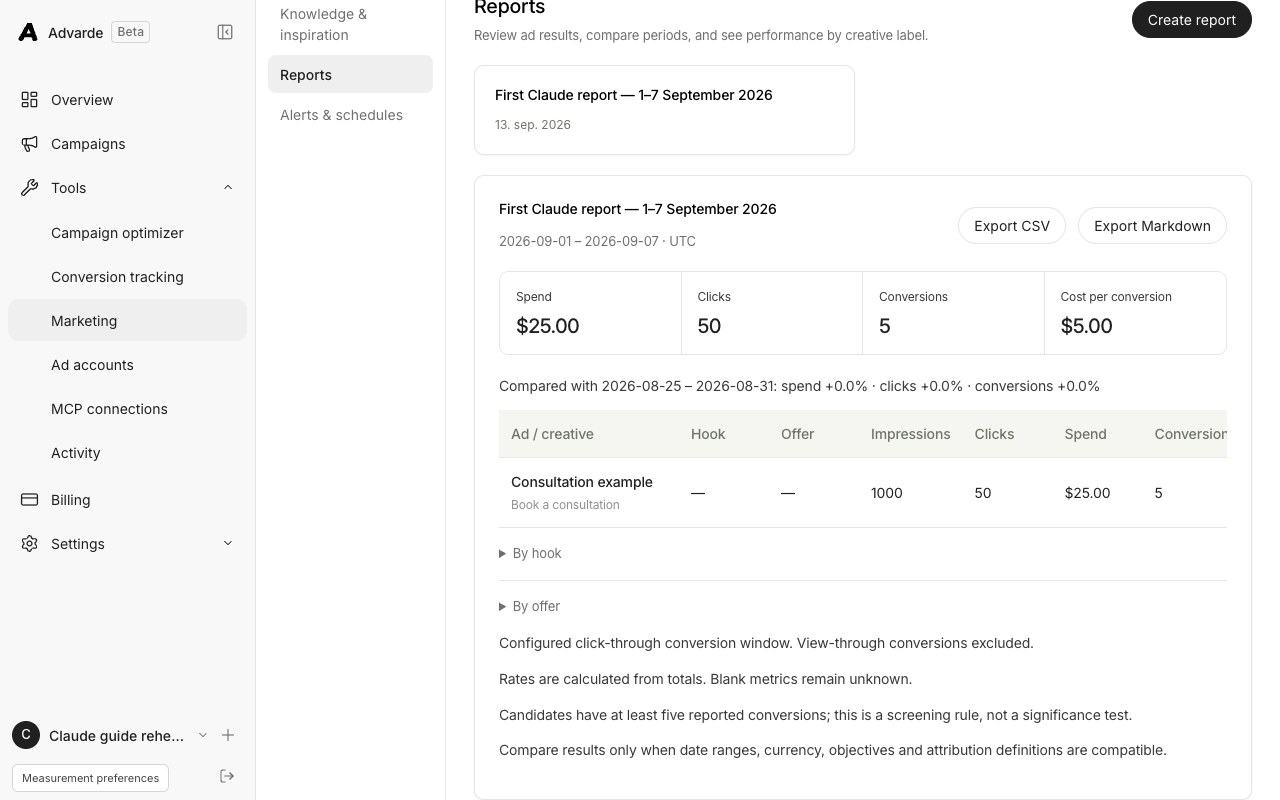
Use a completed date range in the account's timezone. The example covers 1–7 September 2026; replace it with a relevant completed week. ads_create_performance_report saves an ad-level report and compares it with the preceding period of equal length. Its until date must be before today in the account timezone.
The result includes a report id, account, date range, rows, totals, comparison and warnings. Ask Claude to display the account context with every summary, then use ads_get_performance_report to reopen the saved result. The CSV and Markdown formats preserve its source context.
For the verified account_id, call ads_create_performance_report:
name: "First Claude report — 1–7 September 2026"
since: "2026-09-01"
until: "2026-09-07"

Show the report id, account, currency, timezone, date range,
impressions, clicks, spend, CTR, CPC, conversions and CPA.
Include warnings and the comparison dates. Keep missing values unknown.
Then call ads_get_performance_report with that report_id to confirm it saved.
Do not make campaign changes.Read the result without treating missing data as zero
In the reproducible local example, one ad returned 1,000 impressions, 50 clicks, USD 25 spend and 5 conversions. Advarde calculated 5% CTR, USD 0.50 CPC and USD 5 CPA. The comparison period was 25–31 August 2026. These figures demonstrate field handling and arithmetic; they say nothing about expected campaign results.
The saved report uses the configured click-through conversion window and excludes view-through conversions from its conversion total. Revenue remains unknown unless a separate workflow supplies it; this report cannot establish ROAS. Combined rates should come from combined totals, not an average of individual ad rates.
In a second rehearsal, the conversion endpoint denied access. The report retained impressions, clicks and spend, returned null for conversions and CPA, and included a warning. An empty account or unavailable metric needs investigation, not a zero-performance conclusion.
| Result | Next action |
|---|---|
| No ad rows | Confirm the account and date range, then check whether it has campaigns or delivery history. |
| Conversions or CPA unknown | Read the warning and inspect conversion access and setup. Keep the value unknown in your summary. |
| Pagination or size error | Narrow the dates or provide campaign_id. Do not present a partial report as complete. |
| Saved report tool unavailable with read-only access | Use ads_get_ad_account_insights for raw reads, or have a workspace writer save the report. |
4. Save a campaign draft from an approved brief
Give Claude your actual offer, approved image and destination. The prompt below uses illustrative USD amounts and California to make the example concrete. Replace those choices with your approved plan; they are not budget or targeting recommendations.
ads_save_campaign_draft returns a durable draft with an id, revision and status. Saving can preserve incomplete work. Ask Claude to run ads_validate_campaign_draft next: success requires valid=true and no blocking errors. Validation checks the plan and account dependencies, but does not prove that a remote image has uploaded, an ad will pass review or a campaign will deliver.
Use the verified account and the approved materials I provide.
Save a campaign with ads_save_campaign_draft:
- Name: Consultation — first Claude draft
- Objective: clicks
- Lifetime budget: USD 100 (only for a USD account)
- Explicit location: California, resolved to the supported location ID
- One group, "Consultation", with a USD 1.25 click bid
- Context: Booking a local consultation
- Ad title: Book a consultation
- Ad body: Choose a time that works for you.
- Use my supplied approved image and actual booking URL.

If a required input is missing, save the incomplete draft and tell me what is missing.
Return the draft id and revision. Run ads_validate_campaign_draft on that revision.
Show the exact account, budget, locations, bids, copy, image, URL and blockers.
Do not call ads_apply_change or launch advertising.5. Inspect the saved draft and review state
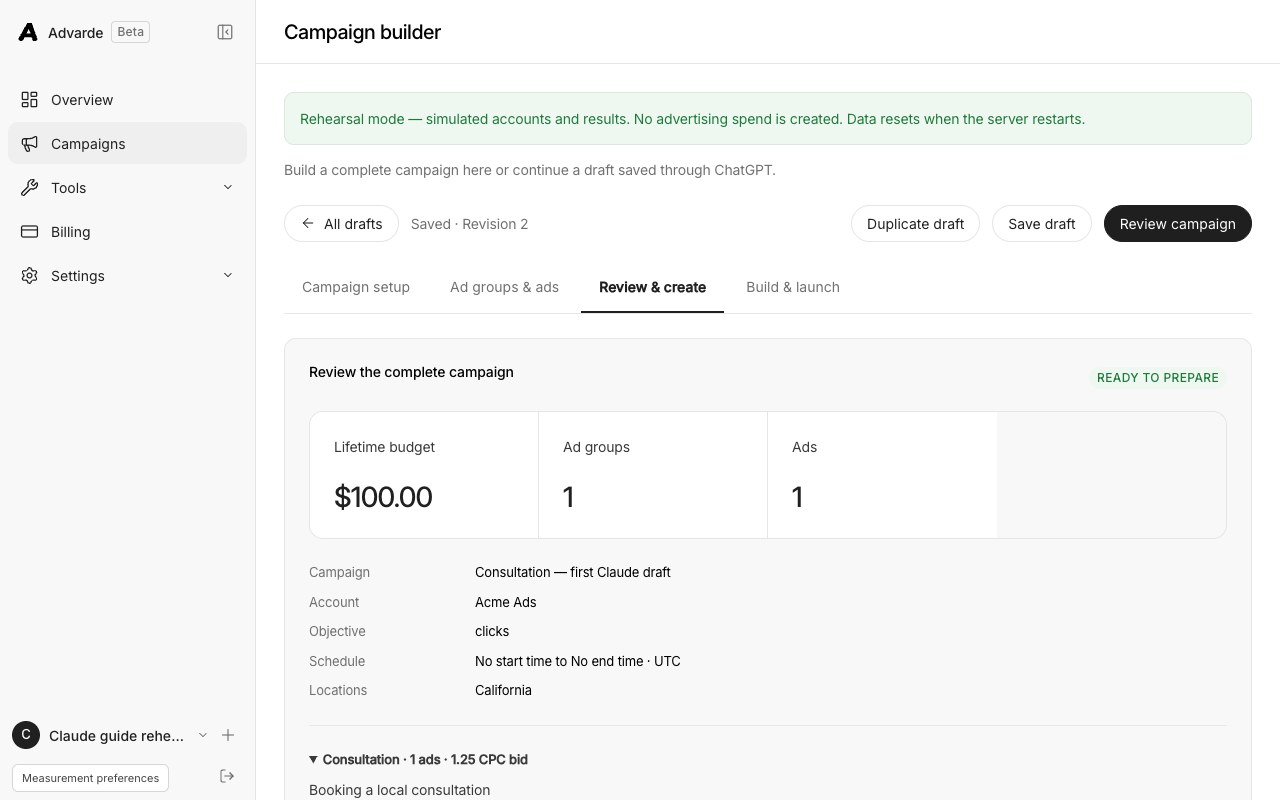
Open Campaign builder in Advarde to find the saved draft, or ask Claude to retrieve it with ads_get_campaign_draft. The MCP rehearsal saved revision 1 and validated it successfully. Preparing that exact revision with ads_prepare_campaign_build returned a change_id and a prepared build. No advertiser resources were created.
When you want a formal review, ask Claude to prepare the current draft revision, then call ads_get_change with the returned change_id. Read the complete account and payload. Preparation does not execute the proposal. Execution uses ads_apply_change after approval, and successful creation leaves new resources paused; activation is a separate reviewed launch.
If someone edits the draft, reload it and validate the new revision before preparing again. If execution ever returns submitted or uncertain, inspect ads_get_campaign_build and reconcile its state before retrying. A prepared, queued or paused campaign is not evidence of live delivery.
Troubleshoot the step that failed
Keep the exact tool name and returned error with the account and time of the attempt. Remove credentials before sharing diagnostics. Changing the advertiser key, workspace and client configuration together makes it harder to identify the cause.
| Symptom | Check and recovery |
|---|---|
| No connector controls in Claude | Check the selected Claude organization and its owner-managed connector configuration. |
| Cannot reach the MCP server | Use the public HTTPS /mcp URL from Advarde. Remote Claude connections originate from Anthropic servers; a localhost URL or a private-network-only service cannot serve that connection. |
| Authorization failed or expired | Reconnect the Advarde connector and complete workspace authorization. Keep the advertiser key in Ad accounts, not in a chat prompt. |
| ads_list_accounts returns an empty array | Connect the advertiser in this Advarde workspace. If it exists elsewhere, reconnect Claude to the intended workspace. |
| Account list succeeds, advertiser read fails | Check the advertiser credential and upstream account access in Ad accounts. A saved connection alone does not establish a working credential. |
| Write tool absent or permission denied | Check the workspace role, ads:write authorization and plan access. Advertiser changes also require writes enabled on the connected ad account. |
| Saved daily report rejects the date range | Use YYYY-MM-DD dates and an until date before today in the account timezone. |
| Draft revision changed or proposal expired | Retrieve the saved draft, inspect the changes, validate and prepare the current revision for a fresh review. |
Disconnect Claude when its work is complete
In Advarde, open MCP connections → Authorized assistants and choose Disconnect for the relevant OAuth connection. If you used a workspace token in another compatible client, revoke that token in its access-token list. You can also explicitly ask ads_disconnect_client to revoke the credential used by the current request.
Remove the connector from Claude's Connectors settings if you no longer want it listed. Revoking assistant access stops that access; it does not pause existing campaigns or revoke the upstream advertiser credential. Handle those actions separately when offboarding a person or client.
Common questions
Does this connect Claude to my ChatGPT subscription?
No. Claude connects to your Advarde workspace, which accesses your separately authorized OpenAI advertiser account. Advertiser eligibility and credentials are still required.
Can Claude create a draft without launching ads?
Yes. ads_save_campaign_draft saves preparation in Advarde. Validate and review that draft before any execution. Creating paused advertiser resources and activating them are separate later operations.
Has this guide been tested with a live Claude advertiser connection?
The account, report and draft sequence was tested through Advarde’s MCP handlers with a local database and simulated advertiser responses on 13 September 2026. A hosted Claude OAuth connection and live advertiser results were not verified in that rehearsal.
Sources and verification
Platform details checked on September 13, 2026. Your account may expose a different set of features. Examples are illustrative unless a dataset is explicitly supplied.