
A useful weekly report lets a reader decide what to do next. It shows the goal, the evidence, the change that matters, and the owner of the next action. A long list of metrics rarely does that on its own.
This guide produces a short decision brief with an evidence appendix. The worked figures are fictional. You can use the format manually or with an assistant connected to Advarde; scheduled data collection and scheduled AI interpretation are separate tasks.
Jump to a step in this guide
Your finished deliverable
A one-page decision brief supported by compatible reports, checked calculations, and a decision log.
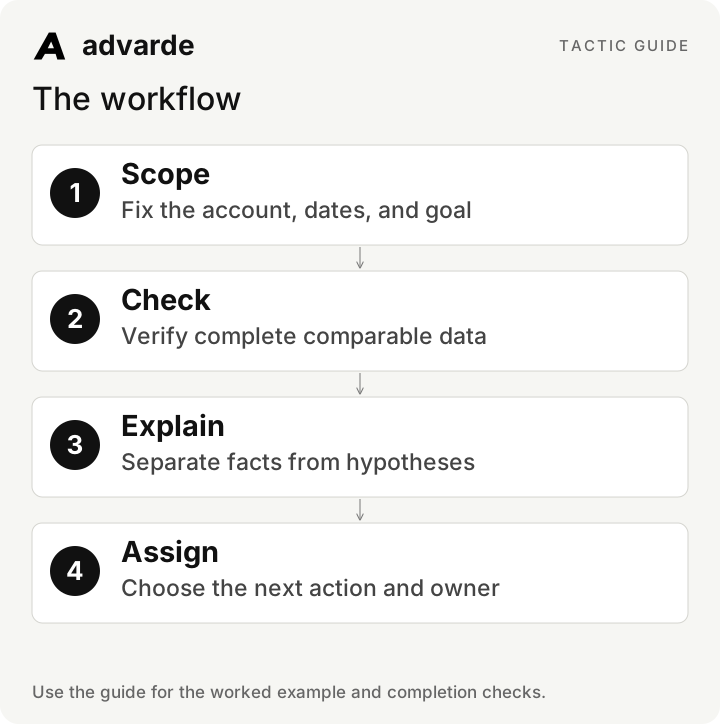
- A selected account, primary goal, and completed reporting period.
- The preceding comparable period and any recorded campaign changes.
- Access to the reports and a person who owns each resulting decision.
1. Define the report’s decision and boundaries
Put the advertiser account, currency, timezone, reporting dates, and conversion definition at the top. Use completed account-local periods. Comparing six days with seven or combining different goals produces differences that may have little to do with performance.
Write the decision you want the brief to inform. “Should we prepare another creative test?” requires a different answer from “Is measurement reliable enough to use CPA?” A report can contain both, but give each its own evidence and next action.
| Header field | Fictional example |
|---|---|
| Account / currency | Northstar / USD |
| Primary goal | Attributed walkthrough bookings |
| Current period | Seven completed account-local days |
| Comparison | The preceding seven completed days |
| Decision | Prepare a new message test or investigate measurement |
| Known change | A destination-page clarification was released during the current period |
2. Read the quality note before the conclusion
Confirm the report has complete rows and the correct dates. Missing conversion access should produce an unknown CPA, not a zero-conversion story. Keep campaigns with no observed delivery visible so a summary does not hide operational problems.
Do not add currencies together or average row-level rates. A portfolio report can list account results side by side with their definitions. If a comparison uses a different attribution basis, explain the difference instead of presenting one combined efficiency number.
Read reports [current ID] and [previous ID] for [account].
First verify date lengths, timezone, currency, goal, completeness, and metric access.
List missing or incompatible evidence before summarizing performance.
Calculate CTR, CPC, and CPA from summed counts, never averages of row rates.
Do not combine currencies or replace unknown data with zero.
3. Calculate the changes that affect the decision
Use absolute values and changes together. In the fictional example below, spend rises 20%, clicks rise 10%, and bookings rise 20%. CPA remains $100. The destination change is relevant context, but the before/after report alone cannot establish its effect.
For percentage change, divide current minus previous by previous. If the previous value is zero, report the absolute change and say the percentage comparison is undefined. Avoid a dramatic percentage attached to a tiny or unusable denominator.
| Metric | Previous | Current | Change |
|---|---|---|---|
| Spend | $1,000 | $1,200 | +$200 / +20% |
| Impressions | 50,000 | 60,000 | +10,000 / +20% |
| Clicks | 500 | 550 | +50 / +10% |
| Bookings | 10 | 12 | +2 / +20% |
| CTR | 1.00% | 0.92% | −0.08 percentage points |
| CPC | $2.00 | $2.18 | +$0.18 / about +9.1% |
| CPA | $100 | $100 | No change |
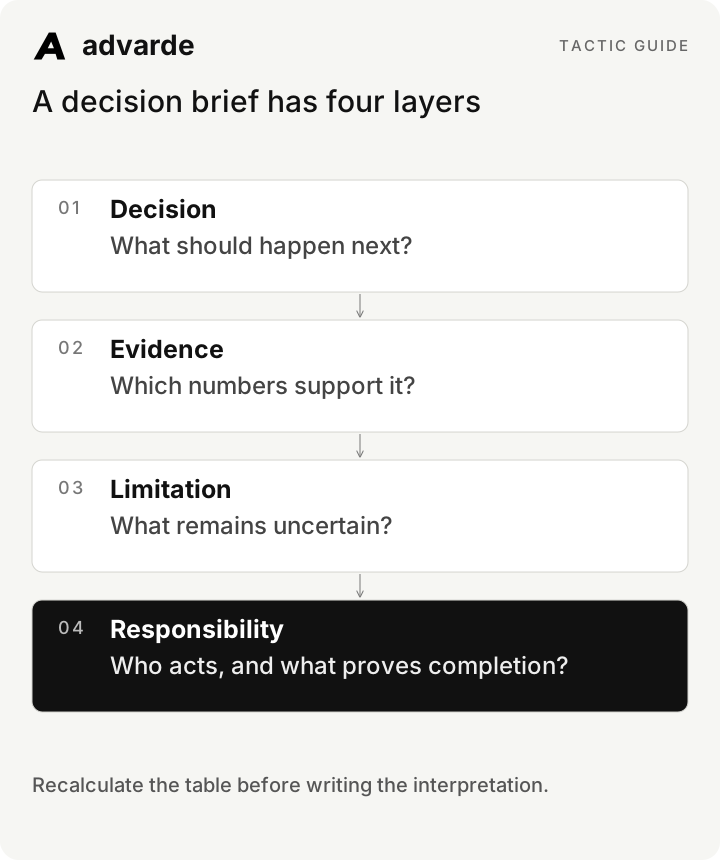
A decision brief has four layers
4. Read the example as an operator
Recalculate before interpreting: twelve bookings versus ten is a 20% increase, and $1,200 divided by twelve is still $100. More bookings alone does not mean better cost efficiency. The current CTR is 550 divided by 60,000, about 0.92%; the current CPC is $1,200 divided by 550, about $2.18.
The defensible observation is that this account spent more and recorded proportionately more bookings, while CTR declined and CPC increased. The next question is whether that pattern persists in a comparable completed period and whether the changed page affected the type or quality of bookings. The report does not answer the latter without appropriate business evidence.
Audit the proposed report narrative against the table.
Recompute every rate and percentage change.
Flag any sentence that contradicts the numbers.
Then write three parts: observed facts, plausible explanations,
and the next evidence needed. Do not infer causality from a before/after comparison.
5. Write the one-page brief
Lead with the decision. Then give three facts, one limitation, and a short action table. Keep the detailed report linked for readers who need the rows. Avoid repeating every metric in prose.
A completed example: “Continue the current campaign while checking the next full period. Spend and bookings both rose 20%, leaving CPA at $100. CPC increased from $2 to about $2.18. A page change occurred during the period, so this comparison does not isolate creative or page effects. Measurement remains available; no budget change is proposed.”
| Action | Evidence or completion condition | Owner |
|---|---|---|
| Verify the changed booking page | Offer and successful-action trigger checked | Website owner |
| Read the next completed period | Same dates convention and event definition | Performance lead |
| Prepare a creative hypothesis if warranted | Observed evidence and approved claim IDs | Creative lead |
6. Add hook and offer analysis when labels are reliable
Advarde can group reports by saved hook and offer labels attached to actual ad IDs. Review label coverage first. An unlabeled ad is not evidence that an angle failed; it is a classification gap.
Use these breakdowns to identify a useful next question. If the same offer appears across different audiences, destinations, or periods, keep those differences visible. A label summary describes observed performance; it does not isolate the causal effect of a hook.
7. Schedule collection and verify the first result
Advarde’s report schedules run on its server. Weekly reports cover the previous seven account-local days; the initial run is due immediately. Confirm the saved schedule, responsible account, and first report before relying on it. Optional email delivery depends on configuration and the schedule owner’s verified address.
A saved report schedule does not automatically create a recurring AI analysis task. If you want an assistant to interpret each report, configure a supported host task separately and verify that it reads the intended report. Keep schedule ownership current when someone leaves the workspace.
8. Keep a decision log
Record the decision, evidence IDs, alternative explanation, owner, and review date. Next week, start by checking what happened to the previous actions. This prevents the same unresolved issue from reappearing as if it were a new insight.
Use one of four outcomes for each question: act within an approved scope, propose a reviewed change, wait for better evidence, or investigate a specific problem. A report itself grants no authorization to change live campaigns.
Create a one-page weekly brief from [verified reports] and [decision log].
Open with the decision, then three material facts and one material limitation.
Check last week's actions. Assign each new action an owner and completion evidence.
Include report IDs, dates, timezone, currency, and event definition.
Separate proposed changes from approved actions. Do not modify campaigns.
Complete the worksheet and check your work
Download the free pack and complete the three editable worksheets in order. It includes this illustrated guide and its worked-example tables so you can use the material offline. Replace the fields with your own verified inputs. The prompts work with supplied material; reading or saving Advarde records requires a compatible authorized connection.
- The account, dates, currency, timezone, and event are explicit.
- Comparisons use complete compatible periods.
- Rates and percentage changes have been recalculated.
- Facts, explanations, and causal limits are distinct.
- Each action has an owner and completion condition.
- The next review starts from the previous decision log.
| Worksheet | Use it for |
|---|---|
| Weekly ad decision brief | weekly-brief.md |
| Report arithmetic and compatibility audit | report-audit.md |
| Advertising decision log | decision-log.md |
Put this tactic to work in Advarde
Create an Advarde workspace to keep the relevant campaign context, reviewed work, and team records together. Use a connected assistant when it helps you draft or inspect the information. Start with the completed worksheet and the exact account and task you intend to manage. The guide and downloads are free; Advarde subscriptions, assistant access, and advertising spend are separate.
Common questions
Can I use the guide without an Advarde account?
Yes. The illustrated guide, examples, prompts, and editable worksheets are available without signup or an email gate. An Advarde account and appropriate access are needed to carry out the product-specific steps.
Does a prompt or worksheet authorize live changes?
No. Planning and analysis prompts prepare work for review. Changes to advertising follow the applicable account permissions and reviewed authorization. Use the actual connected tools and current account capabilities.