Connect the advertiser account you intend to manage before preparing a campaign. You need an Advarde workspace, the appropriate workspace role, and advertiser credentials for an account you are authorized to access.
Before you connect
Confirm the account ID, billing currency, and timezone in the advertiser account. Obtain the advertiser API credential through the supported account settings. A ChatGPT subscription or model API key is not an advertiser credential.
Decide whether the connection should permit changes and which local budget limit is appropriate. Give the connection a clear client or business name. These settings help an operator identify the account and review a proposed change.
- Use an account owned by the intended business.
- Keep the credential out of screenshots and shared briefs.
- Confirm that the person connecting it has permission to manage the advertiser account.
Add and verify the account
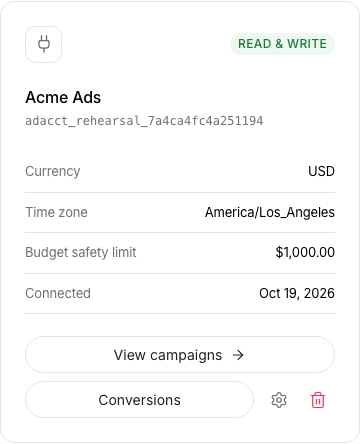
An owner or admin can open Tools → Ad accounts and choose Connect account. Enter an optional Display name and the Advertiser API key, then choose Verify and connect. During first-time onboarding, use the Connect ad account screen instead. New connections are read-only. To permit changes later, review Connection settings, the Maximum budget per change, and Allow campaign changes.
Read the resulting account details and verify the currency and timezone. If a read fails, inspect the returned error before changing several settings. Authentication, account access, and feature availability are different failure categories.
Make the first operation a read
List the account’s campaigns or open its overview. Confirm that the returned names belong to the expected business. If an assistant is connected, ask it to read the account ID and currency before preparing anything.
Next, prepare a small draft without applying a live change. Review the selected account again in the campaign review. A connection name helps recognition; the advertiser ID establishes the actual target.
If access changes
Rotate an exposed or obsolete advertiser credential at its source and update the relevant connection. Recheck a harmless read. Removing a teammate’s workspace access and revoking an upstream advertiser key are separate actions.
During offboarding, inspect assistant connections and active automation policies as well. A stopped automation policy does not pause existing ads; handle live campaign status as its own reviewed operation.
Sources and verification
Advarde workflow and permission controls reviewed on 19 October 2026. Consult the linked provider references for account-specific platform requirements. Your account may expose a different set of features. Examples are illustrative unless a dataset is explicitly supplied.