
A pixel installed on a page does not establish that the right conversion is being measured. A form button click may fail validation; a thank-you page may reload; a browser event may never become an attributed conversion.
This guide helps a marketer and developer verify the full path together. You will create an event contract, run deliberate success and failure checks, and keep the evidence for each layer separate. Use it before launch and after meaningful changes to the funnel.
Jump to a step in this guide
Your finished deliverable
A documented measurement check with a defined primary action, tested triggers, and an assigned owner for any unresolved gap.
- Access to a website or funnel you control and its implementation owner.
- The selected advertiser account, pixel, and configured conversion definition.
- A way to test the real success and failure paths without using customer data.
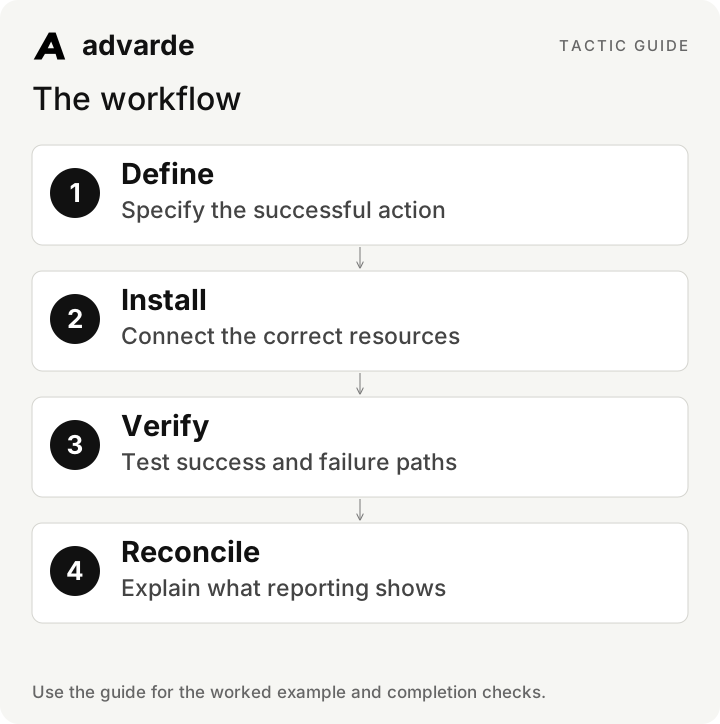
1. Define the business event before the tag
Write a plain-language contract: what happened, when it becomes true, which system knows it, and what identifier represents that occurrence. For a booking, the authoritative action is a confirmed booking record. Opening the calendar or pressing submit does not necessarily mean a booking exists.
Choose the supported event that matches the business action and your campaign configuration. Preserve the exact event definition in the review record. A change from submitted leads to qualified leads changes what the numbers mean.
| Field | Fictional booking funnel |
|---|---|
| Business action | A booking has been confirmed |
| Authoritative success | Booking system returns a successful record |
| Do not count | Calendar opened, invalid form, failed request |
| Occurrence identifier | Stable opaque ID for this one booking |
| Browser/server relationship | The same occurrence shares the same event ID if sent by both |
| Primary reporting definition | The configured supported booking-related event, recorded explicitly |
2. Match the account, source, pixel, and goal
In Advarde, select the account and conversion setup. Review the source and definitions before creating or reusing them. Installation is a separate step from provisioning the resources. Download the instructions for your website, GTM, or server implementation and use the actual identifiers from that setup.
A source ID used in a conversion definition and the pixel ID used by installed code serve different purposes. Keep a resource map so a developer does not copy an ID merely because its name looks familiar. Handle any Conversions API secret through the authorized browser and server environment, not a shared prompt or document.
3. Test the trigger, including the paths that should not count
Make a test matrix before opening the browser. Confirm what happens when validation fails, the server rejects the request, a person double-clicks, and the success page reloads. A successful result once is insufficient if every refresh creates another conversion.
Coordinate the implementation’s consent behavior with the site’s consent setup. Use appropriate test records and redacted diagnostics. Keep raw identifiers and customer payloads out of the worksheet. The example below describes event logic, not an installable SDK snippet.
WHEN the authoritative system confirms a successful business action:
  use the stable ID of that occurrence
  apply the implementation's consent and eligibility checks
  send the configured event through the permitted measurement path
ON retry of the same occurrence:
  retain the same event ID and original occurrence time
ON a new successful occurrence:
  use its own event ID
ON failed validation, failed action, or page refresh alone:
  do not create a new business conversion
Four different kinds of evidence
4. Check browser and server evidence separately
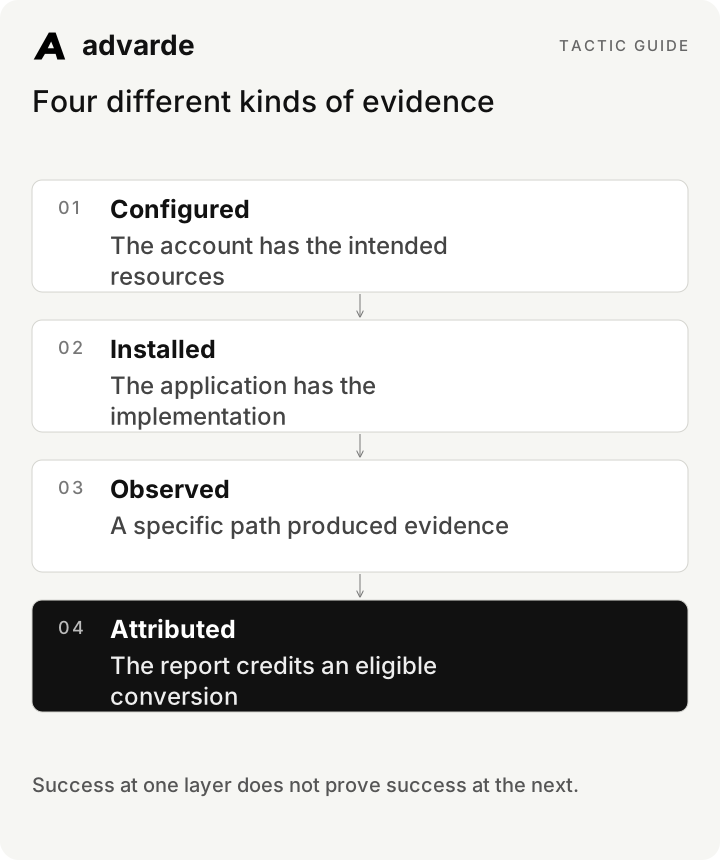
Use the pixel helper on a page you control to inspect browser activity, then inspect the relevant provider diagnostics. A browser observation confirms what the browser did; it does not by itself prove server acceptance or ad attribution.
Advarde’s browser diagnostics expose a limited recent receipt sample. Absence from that sample is inconclusive, especially for server events. Its server validation check uses a non-identifying validation payload: a successful validation does not verify that your production application sends real events correctly.
| Check | What it supports | What it does not establish |
|---|---|---|
| SDK/event observed in browser | Browser executed the observed path | Provider acceptance or attribution |
| Recent sampled receipt | An event appeared in that sample | Complete history or every server event |
| Server payload validation | That validation payload meets checks | Your application’s production integration |
| Attributed conversion report | A conversion was attributed under the report definition | An exact match to every analytics or CRM total |
5. Prevent duplicate occurrences and broken click references
When browser and server paths send the same conversion, use the same event ID so the platform can deduplicate that occurrence. A retry should retain its event ID; a new order or booking needs its own. Reusing one ID for every event loses the distinction between separate actions.
Check your real redirect and navigation path for preservation of the OpenAI click reference when present. Ordinary UTM parameters serve campaign labeling; they do not substitute for the platform’s click reference. Test the URL construction and redirects without inventing or replaying a real user’s click identifier.
6. Use a failure matrix to find the next owner
Record the observed result, expected result, evidence location, and owner for each case. Mark pass, fail, or inconclusive. “Looks fine” is not a reproducible result; another person should be able to repeat the check.
For a transaction value, document what the amount represents and the required currency units in the generated integration. Test a known small amount and verify its interpretation. Do not mix a currency’s major-unit display value with the integer units required by an event payload.
| Scenario | Expected result | Owner if wrong |
|---|---|---|
| Invalid booking form | No booking conversion | Frontend |
| Booking request fails | No successful-action conversion | Frontend/backend |
| Confirmed booking | One occurrence through configured paths | Implementation owner |
| Success page refresh | No new occurrence | Frontend |
| Retry or browser + server send | Same occurrence retains its event ID | Backend/measurement |
| Valid event but no attribution | Investigate definition, click eligibility, window, and reporting | Measurement owner |
7. Reconcile reporting before changing the ads
Compare the same event, dates, timezone, and attribution definition. A CRM may count bookings by booking time while an ad report follows its own attribution rules. Do not expect every total to match without establishing that the definitions match.
If counts diverge, investigate duplicate triggers, event selection, consent, date boundaries, reporting delay, and available attribution signals. Only then decide whether campaign performance is the problem. Keep inconclusive tracking checks visible in the weekly review.
Review these redacted measurement records: [event contract, test matrix, reports].
State what is configured, installed, observed, validated, and attributed.
Check event definition, account, dates, timezone, duplicate behavior, and URL handling.
For each mismatch give the next diagnostic step and responsible role.
Do not treat missing sampled events as proof that tracking is absent.
Do not infer zero conversions from unavailable reporting.Complete the worksheet and check your work
Download the free pack and complete the three editable worksheets in order. It includes this illustrated guide and its worked-example tables so you can use the material offline. Replace the fields with your own verified inputs. The prompts work with supplied material; reading or saving Advarde records requires a compatible authorized connection.
- The successful action and authoritative system are defined.
- Failed actions and refreshes do not create new occurrences.
- The correct account, pixel, source, and event are documented.
- Retries and dual browser/server delivery use consistent occurrence IDs.
- Browser observations, validation, and attribution are reported separately.
- Unresolved measurement issues have evidence and a named owner.
| Worksheet | Use it for |
|---|---|
| Business event contract | event-contract.md |
| Measurement verification matrix | measurement-test-matrix.md |
| Conversion reporting reconciliation | report-reconciliation.md |
Put this tactic to work in Advarde
Create an Advarde workspace to keep the relevant campaign context, reviewed work, and team records together. Use a connected assistant when it helps you draft or inspect the information. Start with the completed worksheet and the exact account and task you intend to manage. The guide and downloads are free; Advarde subscriptions, assistant access, and advertising spend are separate.
Common questions
Can I use the guide without an Advarde account?
Yes. The illustrated guide, examples, prompts, and editable worksheets are available without signup or an email gate. An Advarde account and appropriate access are needed to carry out the product-specific steps.
Does a prompt or worksheet authorize live changes?
No. Planning and analysis prompts prepare work for review. Changes to advertising follow the applicable account permissions and reviewed authorization. Use the actual connected tools and current account capabilities.