To launch ChatGPT ads, you need an eligible advertiser account, billing, a campaign with ad groups and ads, and a working destination. If you want to measure enquiries, bookings, or purchases, set up and test conversion tracking before spending.
This guide takes you through the process in OpenAI Ads Manager and Advarde. It includes the screens to look for, what to enter, a worked studio-booking example, and checks for the first week. OpenAI screenshots come from its published help documentation. Advarde screenshots show the real application with demonstration data, not campaign performance claims. For a shorter independent overview of ChatGPT ads — placements, Ads Manager buying steps, and published pricing — start with the ChatGPT ads guide.
Jump to a step in this guide
September 2026: check the workflow before you launch
Checked 17 September 2026. The 16 September announcement adds several routes into ChatGPT advertising. Use the dated availability table below before choosing a workflow. This is a source-based reference, not a test of the new features.
The launch steps in this guide cover Ads Manager and Advarde. For another interface, confirm which advertiser account it controls and record the campaign IDs it creates. Keep one owner responsible for the launch so two tools do not create the same campaign.
- Record the business, advertiser account, market, chosen interface and person who can approve spend.
- Save the exact proposed campaign, budget and destination before applying changes.
- Verify the created resources in the account; retain their IDs instead of recreating an uncertain result.
- Complete one real test action and keep its event receipt separate from later ad attribution.
- Name the person who will review delivery and conversion quality, with a review date.
| Feature or workflow | Published status on 17 September | Check before using it |
|---|---|---|
| Sponsored Agents | Testing with selected US advertisers. [1] | Confirm participation; do not promise this format to a client without access. |
| Ads Manager plugin | Campaign creation, updates and analysis in ChatGPT are rolling out. [1] | Inspect the connected account and requested changes before approving them. |
| AI creative tools | Ads Manager suggests copy/images for review; optional text customization adapts and translates copy. [1] | Record the customization setting and review supported claims and destinations. |
| HubSpot | Account connection, campaign work, reporting and lead follow-up announced for 16 September. [1] | Identify the CRM owner and the business outcome being measured. |
| Shopify | OpenAI announced US access for 16 September and expansion to eligible international markets for 23 September. [1] The official app lists catalog sync, campaign management and conversion measurement. [2] | Check current store eligibility and verify a completed purchase before interpreting results. |
1. Choose your launch workflow
OpenAI Ads Manager handles advertiser-account requirements, billing and campaign management. Eligible businesses can also begin setup from ChatGPT; see the account steps below. Advarde connects to an existing advertiser account and adds campaign drafts, conversion setup, reporting, and a workspace for your team and connected AI assistants.
Choose one place to prepare the first campaign. The walkthrough below covers direct setup in Ads Manager and the Advarde workflow. If you use another supported interface, use the availability table above and map each launch check to that interface. Reuse the intended advertiser account and verify what already exists before creating anything.
For this walkthrough, imagine a studio that wants enquiries from small teams planning an offsite. The offer is a visit to see the space, the destination explains capacity and location, and success means a confirmed consultation booking. The example’s $500 allocation is a planning assumption, not a platform minimum or recommended spend.
| Task | Where to do it | What you should finish with |
|---|---|---|
| Advertiser onboarding and billing | OpenAI Ads Manager; eligible setup can begin in ChatGPT | An eligible account with the required setup complete |
| Direct campaign creation | OpenAI Ads Manager | A campaign, its ad groups, and its ads |
| Collaborative campaign preparation | Advarde Campaigns | A saved draft and an exact change to review |
| Website measurement | Your website or tag manager, plus conversion setup | A tested event for a completed customer action |
| Performance review | Ads Manager or Advarde | Delivery and conversion results for a defined period |
2. Set up the advertiser account
Start with OpenAI’s account setup guide linked below. Confirm advertiser availability for the business country and sign in with the account that should own the advertising relationship. If you already have an advertiser account, request access to it instead of starting another setup.
Checked 25 September 2026: eligible businesses can also begin setup through ChatGPT Ads Manager in ChatGPT. Availability depends on the advertiser account’s country, not the ChatGPT login’s country. Creating an account for an unsupported country does not unlock access. Review the proposed account details, then finish any remaining billing, tax and identity checks in Ads Manager. This route does not support individual advertisers or an agency opening an account for a client.
Before creating another account, check how many accounts your OpenAI login belongs to. At 10 or more, including accounts joined by invitation, self-service creation is unavailable; you can still accept invitations to existing accounts. Below that count, creation still depends on eligible self-serve credit-card billing, organization permissions and other requirements. Reuse the intended account while a verification review is pending.
Complete the onboarding, verification, account information, billing, and team-access steps shown in Ads Manager. Review the legal entity, website, country, currency, and time zone carefully. OpenAI says the country, billing currency, and time zone cannot be changed after account creation. Verification and account review are separate; finishing a verification form does not itself establish that campaigns can serve.
For an agency engagement, have the client create its business advertiser account and invite the agency afterward, as described in OpenAI’s setup guidance. Decide which person owns billing and which person can approve launch. A ChatGPT subscription, a model API key, and an Advarde subscription do not grant advertiser eligibility.
Keep a short account record with the advertiser ID, business name, currency, time zone, owner, and the status of any unfinished requirement. This makes the next connection and campaign checks much easier.
3. Write the brief and spending limit
Write a one-page brief before opening the campaign form. It should state the offer, who can buy it, the destination, the completed action you will count, and the maximum amount approved for the test. Include the date when someone will review the results and the person who can pause delivery.
Use your own economics to decide what an outcome is worth. Suppose a qualified booking contributes an expected $80 after accounting for how many bookings become customers. If 4% of paid clicks become qualified bookings, the break-even CPC is $80 × 0.04 = $3.20 before software, management, and other acquisition costs. This is an example calculation, not a forecast of ChatGPT Ads pricing.
At an assumed $2 CPC, a $500 test would buy about 250 clicks. A 4% conversion assumption implies ten qualified bookings on average; an actual small test can vary substantially. Keep both assumptions visible when you assess the result. Do not call a raw form submission “qualified” simply because it appears in a report.
Write a practical decision rule: pause immediately if the booking flow breaks; review messaging if visits arrive without relevant enquiries; consider another test if qualified bookings appear at an acceptable cost. A spending limit without a decision rule only tells the team when money runs out.
| Brief field | Illustrative studio campaign |
|---|---|
| Offer | Visit a studio for a small-team offsite |
| Business outcome | Confirmed consultation booking; assess qualification separately |
| Audience situation | A team comparing spaces for a focused workshop |
| Destination | A page with the location, capacity, photos, and booking form |
| Budget and review | $500 total test allocation; review delivery next day and outcomes after one week |
| Creative plan | One ad group with two distinct messages to begin |
4. Connect the account to Advarde
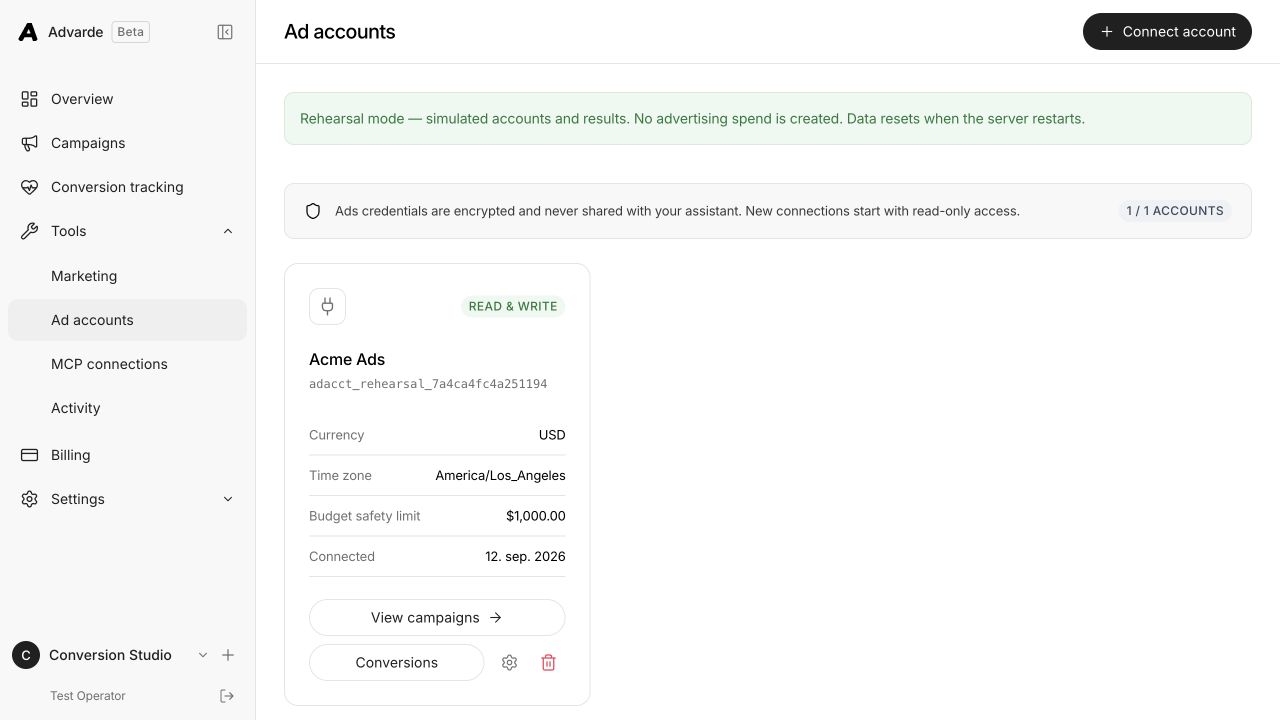
If you are launching entirely in Ads Manager, continue to the tracking and campaign sections. For Advarde, sign in, select the intended workspace, and open Ad accounts under Settings. Choose Connect account. Use an advertiser API key issued for this ad account; each Ads API key belongs to one advertiser account.
Enter the credential in the connection form. Advarde checks the account and retains its currency and time zone. Confirm that the returned account is the advertiser in your brief, then give the connection a clear name. In a multi-client workspace, a name such as “Studio — US — USD” is more useful than “Main account.”
Inspect the connection’s write setting and your workspace role. You can inspect an account with read-only access, but campaign creation and conversion setup need the relevant permissions. An owner or admin should configure those permissions for the intended operator.
Open Overview and select the new account. Check that its name and currency appear as expected. A new account may have no reporting history; that is different from a connection error. Connect an AI assistant later if useful—the browser interface is sufficient for this guide.
5. Choose what to measure
In Advarde, open Conversion tracking, select the advertiser account, and choose Set up conversions. Pick the preset closest to the customer journey. The booking preset is appropriate for the studio example because it distinguishes an enquiry from an appointment.
Give the setup a recognizable name and enter the website or funnel destination. Review every included event before saving. A page visit can describe interest, a submitted enquiry can describe a lead, and a completed booking can describe the desired outcome. Choose the event based on what your application actually confirms.
For a shop, the useful final action may be an accepted order. For software, it may be a completed registration or a started trial. For a service business, it may be an appointment recorded in the booking system. Avoid counting a button click as a completed transaction unless clicking the button is itself the outcome you intend to buy.
Write down the exact success condition next to the event. “The booking system returns a confirmed appointment ID” gives the website developer a clear trigger. “The person seems interested” does not.

6. Review the pixel and event definitions
Continue through Configure and Review. Check the advertiser account, the pixel to create or reuse, the events, the primary outcome, and the attribution setting. Reusing an existing pixel can be appropriate when it already belongs to this website and advertiser; creating another one without checking can make reporting and installation harder to reconcile.
The screenshot shows the studio’s page-view, lead, and appointment definitions, with the booking event marked as primary. Its 30-day window is an example setting, not a universal recommendation. Choose the available setting that suits the customer decision period and keep it consistent when comparing reports.
Use Create conversion setup when the proposed resources match the plan. This prepares the measurement resources. You still need to install the website code and test a real customer action.
If setup stops partway through, inspect the saved result before trying again. Record which resources already exist and which step failed. Repeatedly creating new pixels or definitions can turn one configuration problem into several competing installations.

7. Install the pixel or server integration
Open the setup’s Installation tab and choose Website code, Google Tag Manager, or Server-side API. Use the instructions generated for that setup so the pixel ID and event names match the resources you just reviewed.
For Google Tag Manager, start with the generated base snippet in a Custom HTML tag. Configure the event tags and variables described in Advarde, then connect them to the website’s successful-action signals. Use Preview to step through the full journey. Publish the container only after checking the success and failure cases. Confirm whether someone has already installed the base code directly on the website before adding it through GTM.
Wire measurement consent to the site’s consent controls. Advarde’s generated helper starts with consent denied; merely adding the snippet does not make it send events. OpenAI’s pixel documentation describes how consent changes affect future events. Test the actual consent choices on your site instead of assuming that the presence of a banner controls the tag.
For server measurement, use the destination backend that knows the transaction succeeded. Store the Conversions API credential on that server. It is a different credential from the advertiser-management key used to connect Advarde. Have the implementation owner verify the actual dispatch path as well as the configuration.

8. Prove that tracking works
Complete a test booking and confirm it exists in the booking system. Then use Advarde’s Test events tab and the browser inspection tools to follow the event. Note the action ID, time, event name, and pixel. This gives you a specific example to investigate if one of the checks fails.
Refresh the confirmation page and retry the request. A single booking should retain the same event ID when retried or reported through another integration. Test an abandoned booking and an unsuccessful form submission too; neither should emit the completed-booking event.
Check the browser and server paths separately if both are installed. A server validation request with validate_only enabled checks the payload without saving a conversion. Advarde’s recent browser receipts do not prove that your production backend sends server events.
Finally, distinguish event receipt from advertising attribution. A direct test visit can confirm installation without creating an attributed ad conversion. Your campaign report requires an eligible advertising interaction and the relevant reporting rules. Do not “fix” a zero attributed total by firing extra events.

| Check | Evidence to retain |
|---|---|
| Business action | Confirmed booking or order in the source system |
| Browser installation | Correct pixel, consent state, and event call |
| Event delivery | Receipt or server response for the test action |
| Duplicate handling | The same action ID on refresh or retry |
| Attribution | Later campaign reporting with the event and reporting window recorded |
9. Create the campaign in Ads Manager
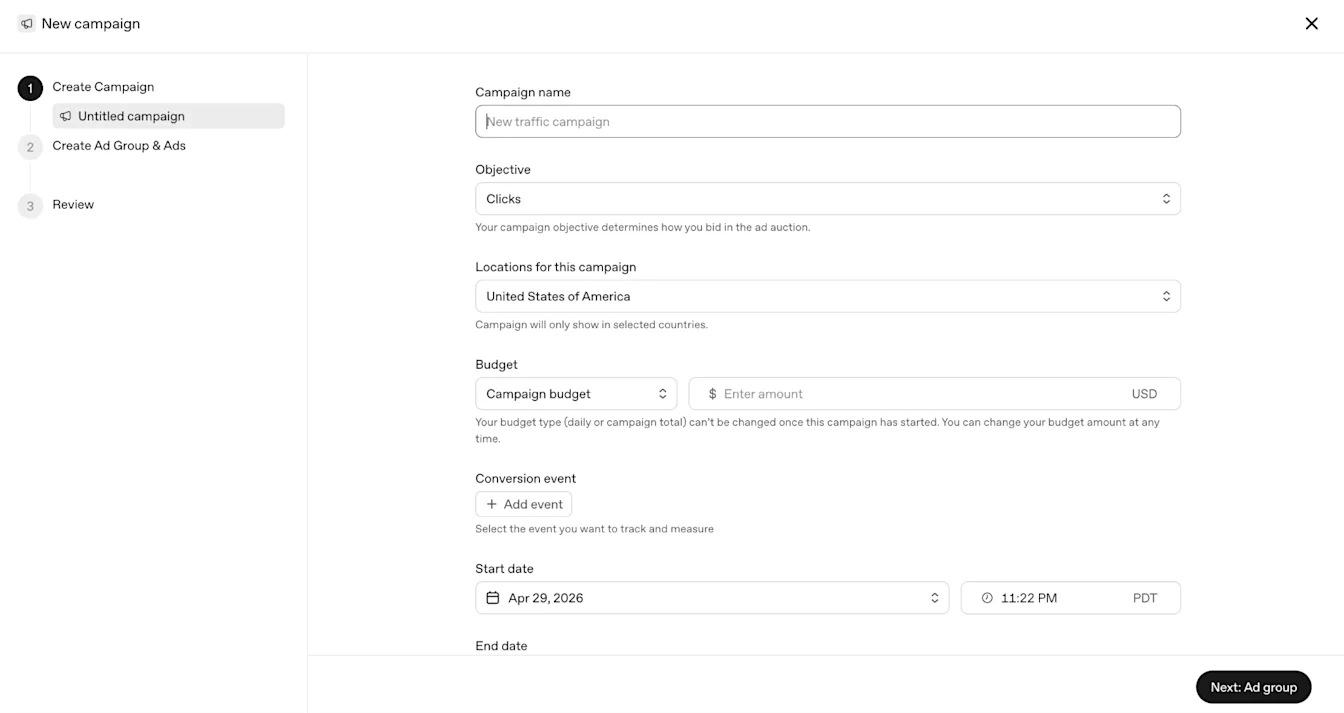
For the direct Ads Manager workflow, choose Create, then Create campaign. The screenshot at the top of this guide shows the campaign form and the progression to ad groups and review. Complete the objective, budget, dates, and locations before proceeding.
Name the campaign so a colleague can identify the offer and purpose in a report. “Studio | offsite enquiries | September test” says more than “Campaign 1.” Use the advertiser account and currency recorded in the brief. If the form’s currency differs from the approved plan, resolve the account selection before entering amounts.
Choose a campaign-total budget for a defined overall allocation, or a daily budget for the available daily pacing model. A daily budget is an average delivery target, not a strict same-day ceiling. Check OpenAI’s current daily-budget rules and your billing currency’s minimum before committing the amount.
Select the locations you can serve explicitly. For a physical studio, review whether the available locations match a realistic travel area, and make the studio’s address clear on the destination page. Check the time zone beside the schedule and record the intended start and end. A correct calendar date in the wrong time zone can still produce the wrong launch time.
10. Select the objective and billing model
Decide what delivery should optimize toward and how you will be charged. These are related choices, but a conversion goal does not mean payment occurs only when a customer converts.
OpenAI’s current conversion-campaign guidance describes click billing (oCPC) and impression billing (oCPM), with oCPM availability still expanding. Conversion campaigns need a supported standard event. The selected objective, billing model, and conversion event cannot be changed after creation; use a new campaign if the experiment needs a different setup.
In Ads Manager, select Conversions when that is your plan, choose the available billing option, and select the event you tested. For the studio, confirm it is the appointment outcome rather than the preliminary page visit. Review the available bid controls carefully: OpenAI describes a conversion-campaign Bid Cap as a bid for the conversion outcome, not a maximum CPC.
Advarde’s current builder exposes its own supported objective and budget fields. A newer Ads Manager feature does not automatically become available in Advarde. If the exact billing model or setting you need is absent, use the supported Ads Manager workflow instead of trying to approximate it with a differently named field.
| Campaign approach | What it is for | Billing to check |
|---|---|---|
| Impression-focused | Reach and visibility | CPM: impressions |
| Click-focused | Website traffic | CPC: valid clicks |
| Conversion-focused with oCPC | A selected downstream event | Valid clicks |
| Conversion-focused with oCPM, where available | A selected downstream event | Impressions |
11. Build focused ad groups and context hints
Create an ad group under the campaign for each meaningfully different buying situation. For the first studio test, one group for small teams planning an offsite is enough to examine that offer. Add a separate freelancer group only if you have a distinct message, suitable destination, and enough budget to evaluate it.
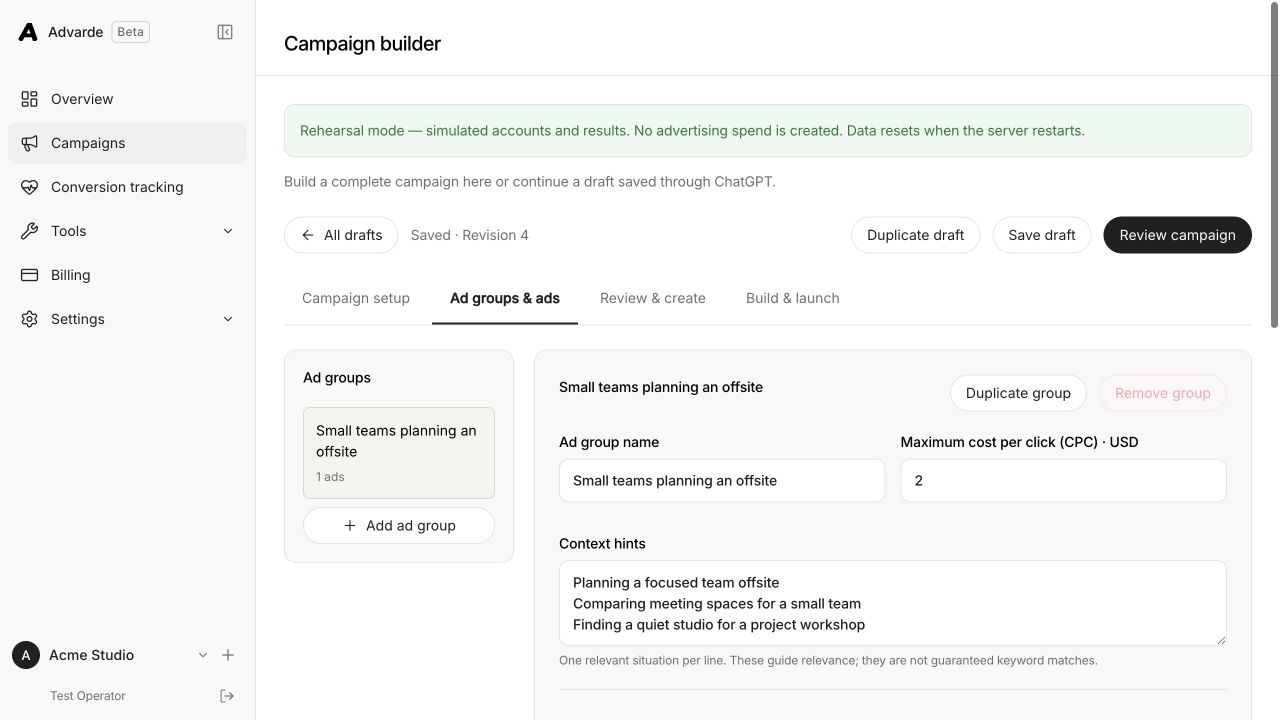
Context hints explain the needs and situations in which the offer is useful. They are relevance inputs, not exact-match keywords or a guarantee that an ad appears in a particular conversation. Describe something the business can actually help with.
In Advarde, continue to Ad groups & ads, enter the group name, and add one hint per line. The screenshot uses a $2 maximum CPC for a click campaign. That is an illustrative input, not a recommended auction bid, and it should not be copied into a conversion bid field without understanding the different unit.
Read the hints alongside the landing page. If a hint promises a workshop venue but the page offers only individual desks, revise the offer or create an appropriate destination before launch. Each hint should add information that helps explain the product’s fit.
| Too broad | More useful studio example |
|---|---|
| Meeting space | A small team comparing quiet spaces for a planning workshop |
| Office | A remote team arranging an in-person offsite for a day |
| Creative work | A project team looking for a studio with room to collaborate |
12. Create ads and check the destination
Give each ad a specific benefit, an image that supports it, and the destination where the visitor can act. Use the title to identify the value and the supporting copy to add a useful detail. Two versions should test different reasons to choose the offer, not just rearrange the same words.
For the studio, a collaboration message and a quiet-work message are different angles. Use genuine photos that help someone assess the space. A recognizable room, layout, or product image communicates more at a small size than a slide full of tiny text.
OpenAI’s launch guide lists a maximum of 50 characters for titles and 100 for copy, and square PNG or JPG images up to 1200 × 1200. Check the current editor’s validation and preview before submission. The creative, image, and landing page must also meet the applicable ad policies.
Open every final URL on a phone as well as a desktop. Read the page as a new visitor: can you identify the location, capacity, next step, and anything needed to book? Submit the form and test the error state. If the ad promises a studio visit, the destination should make that visit easy to request.
Add consistent campaign tags for your analytics and check that redirects preserve them. Use descriptive non-personal values. Keep customer names, email addresses, and credentials out of tracking URLs. Build those tags with the UTM URL Generator before you paste destinations into Ads Manager.
| Element | Collaboration angle | Quiet-work angle |
|---|---|---|
| Title | Space for team workshops | A quiet place to plan |
| Copy | Explore a studio for your next team offsite. | Find room for focused work with your team. |
| Image | A genuine photo of the shared workshop area | A genuine photo showing the workspace |
| Destination | Studio page with capacity, location, and booking | The same offer, with the quiet-work benefit explained |
https://example.com/studio?utm_source=chatgpt&utm_medium=paid&utm_campaign=studio_offsite_test&utm_content=workshop_space13. Prepare the campaign in Advarde
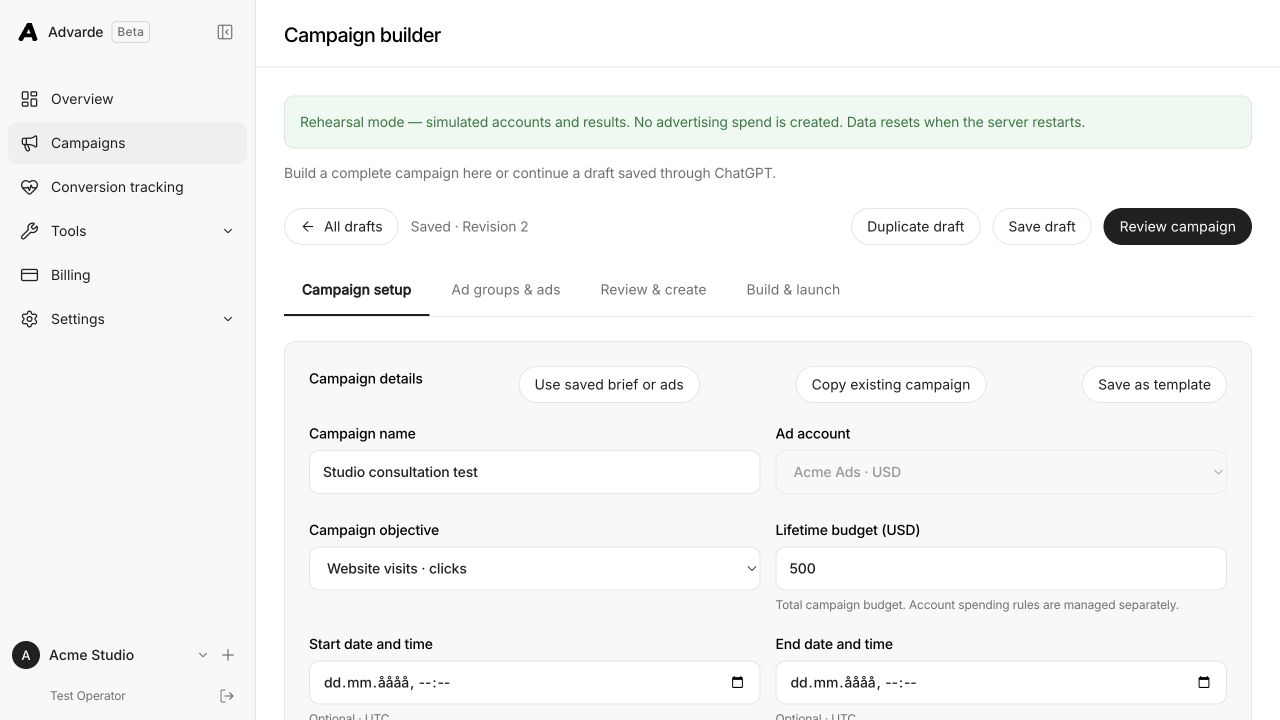
For the Advarde workflow, open Campaigns and choose Create campaign. Select the advertiser account before saving, enter the campaign name, and choose the supported objective. In the current builder, the budget field is Lifetime budget in the account currency; it represents the total campaign allocation.
Enter the locations and dates deliberately, then continue to the ad groups and ads. If you select Conversions, choose an eligible goal from the account’s conversion settings. A saved tracking draft by itself is not the same as an available campaign goal. Resolve any missing-goal message in Conversion tracking.
The builder can also start from a saved brief, template, or copied campaign. Treat those as starting points: review every inherited account, URL, event, budget, and location. A previous client’s otherwise well-written creative is still the wrong campaign for this account.
Choose Save draft, then Review campaign. Record the draft revision that your reviewer sees. If another operator or assistant updates the campaign after review, inspect the new version before approving creation.
Dates entered in a planning interface should be checked against the exact creation plan and the resulting platform settings. Read any warning about a field that cannot be applied through the selected creation path. Do not assume that a saved date alone schedules delivery.
14. Review and create the campaign paused
In Advarde, open Review & create and choose Check campaign. Work through the returned errors and warnings. The review should show the whole campaign, including every ad group and ad, so the approver can assess the change together.
Compare the prepared change to the brief line by line. Check the advertiser account, objective, budget amount and type, dates, locations, conversion goal, bids, ad copy, images, and final URLs. For copied or imported work, pay particular attention to parent relationships: each ad must belong to the intended group, and each group to the intended campaign.
When the validation passes, choose Prepare paused campaign, inspect the approval, and use Approve and create paused. Follow the Build & launch status until creation finishes. Keep the platform IDs and build result with the campaign record.
If the build is partial or its outcome is uncertain, use Check and reconcile and inspect what already exists. Starting again with a duplicate draft can create duplicate resources. A local validation success also does not establish platform policy approval; review status remains a separate check.
- The account and currency match the approved brief.
- The budget, bid units, locations, and schedule are intentional.
- The primary event represents the intended business outcome.
- Each ad’s promise is supported by its image and destination.
- Any unsupported field or incomplete operation has been resolved.
15. Approve launch and confirm delivery
Creating the campaign paused gives you a final opportunity to inspect the actual platform resources. In Advarde’s Build & launch view, choose Check launch readiness. Read the returned resource states and any review, parent-state, or schedule issue.
When ready, choose Review launch, then Prepare launch for approval. Review the live resources, budget, targeting, and launch window in the prepared approval. Use Approve launch only for the version the budget owner has approved. A scheduled launch also needs the requested start and latest permitted launch time; inspect the saved result after approval.
If you built directly in Ads Manager, review the created campaign hierarchy and the account’s launch requirements there, then make the intended campaign, groups, and ads active. Confirm the resulting status rather than assuming that closing the creation form started delivery.
Record the actual activation time and assign someone to check delivery. If the launch is held, read the specific reason. If the booking page stops working, pause the affected campaign while the team fixes and retests it. This operational owner should be clear before the first impression, not chosen after someone notices a problem.
16. Use bulk upload for larger launches
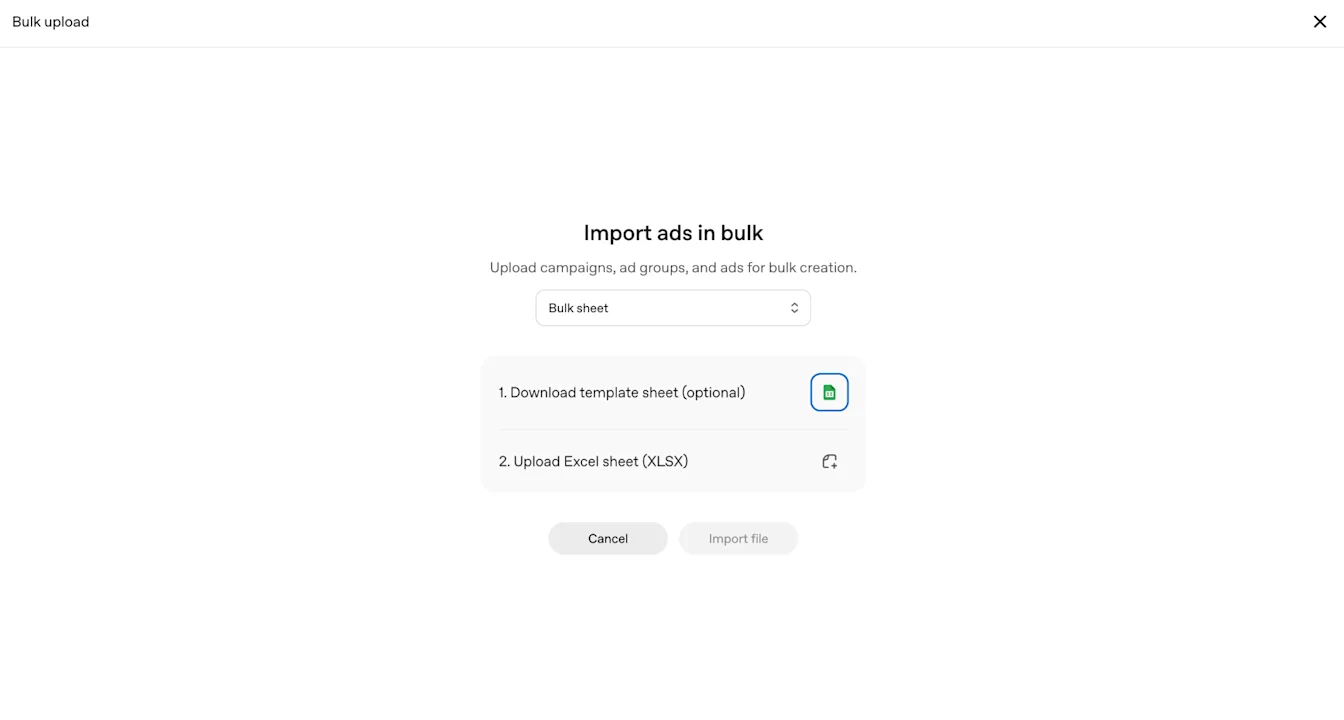
Once the first campaign structure is clear, a workbook can be useful for preparing several campaigns or creative variations. Download the current template from the upload flow you will actually use. OpenAI’s published screenshot shows an Excel upload screen; its latest launch instructions also describe CSV upload. Follow the format currently requested by your account rather than converting an older file by guesswork.
OpenAI’s current Ads Manager documentation says CSV upload does not support creating product-feed campaigns. Check the campaign type before preparing a bulk file. If you need a product-feed campaign, use the supported creation workflow in your account; changing the spreadsheet format does not remove this restriction.
Keep a dated original and a separate working copy. Preserve the required column names and the relationships between campaigns, groups, and ads. Give each row an intentional destination. Validate image links by opening them directly; a file-sharing preview page is different from the image itself.
Advarde provides an editable workbook and a local workbook validator. Its importer and the Ads Manager upload are different submission paths with their own supported fields. In particular, Advarde’s limited bulk creation path can reject conversion campaigns and warn about date handling. Read the compiled review before deciding whether the workbook is the right path.
After submission, inspect row-level results. Reconcile anything already created before retrying failed rows. Keep the submitted version, result, and resulting IDs together so a teammate can tell whether a later file is an edit or another create operation.
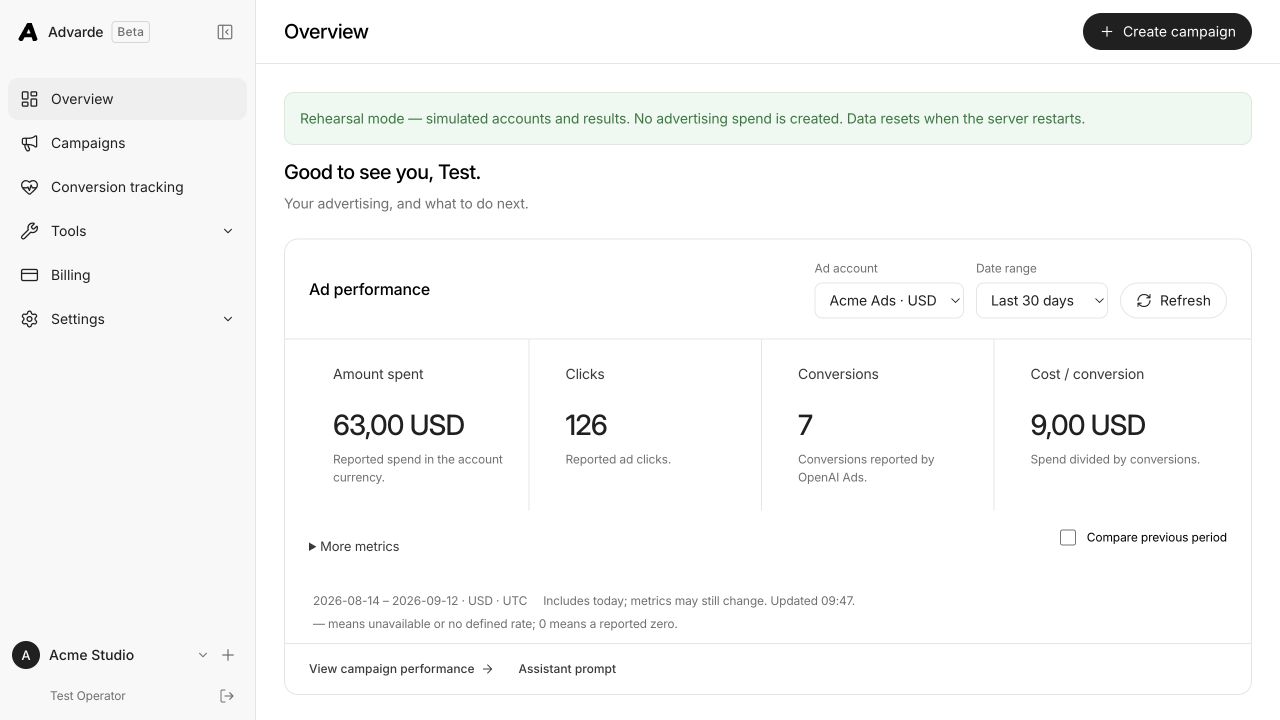
17. Read the Advarde overview dashboard
Open Overview, select the advertiser account, and set the date range before interpreting any number. Check the currency, time zone, and update information alongside the report. A range that includes today can still be incomplete.
The example screenshot shows $63 spent, 126 clicks, and seven reported conversions. Dividing $63 by seven gives $9 per conversion. These are demonstration numbers used to explain the interface. They are not results from a live studio campaign or a performance benchmark.
The label “conversion” also needs a definition. If the campaign counts initial enquiries, $9 per conversion is an enquiry cost, not a customer acquisition cost. Add qualification and sales outcomes from the business system before drawing conclusions about profitability.
Use Compare previous period when the comparison makes sense. Check whether both periods have similar duration and enough time for conversions and follow-up. A seven-day period with one day of active advertising is a poor comparison to a full week of delivery.
If spend is unavailable or still updating, retain that limitation in the review. OpenAI’s reporting can update at different times across metrics. Treat a recent zero with care, especially before deciding that additional spending is harmless.
18. Inspect campaigns, ad groups, and ads
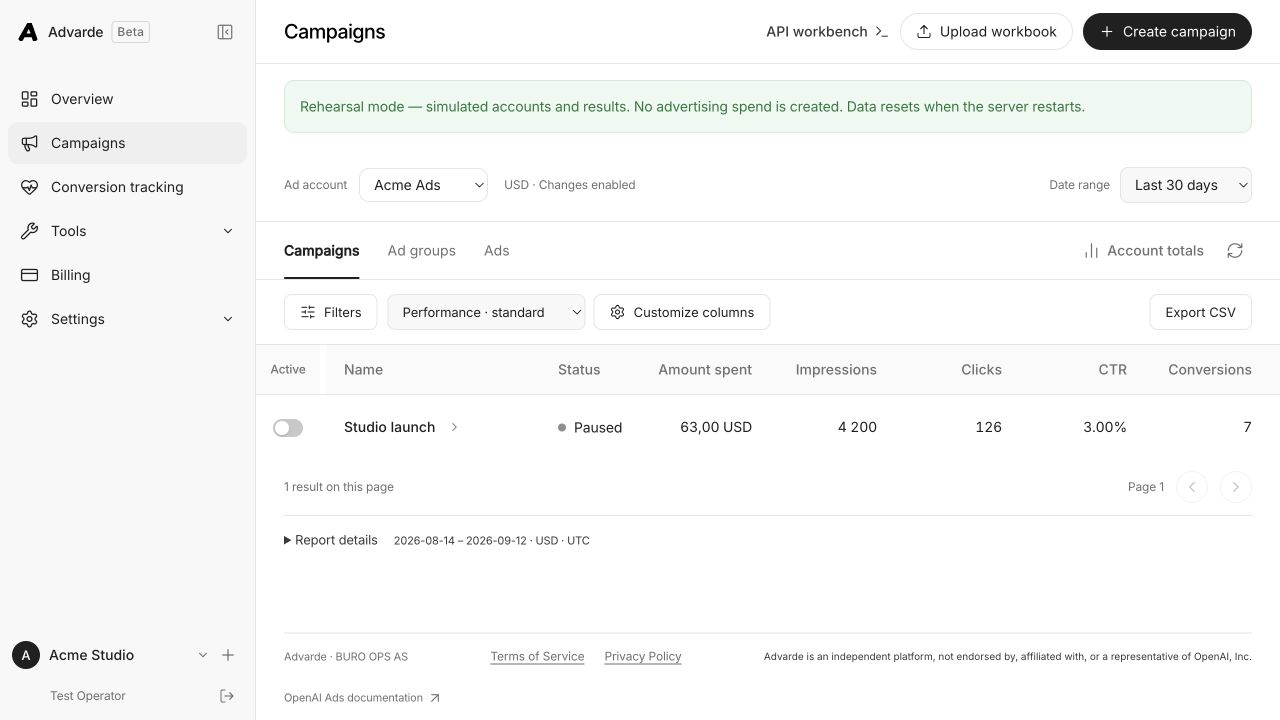
From Overview, open View campaign performance, or use Campaigns in the sidebar. Set the account and date range again if needed. The Campaigns, Ad groups, and Ads tabs let you move from overall delivery to the objects responsible for it.
Start with status and spend, then inspect impressions, clicks, click-through rate, and the configured conversions. Use the available column controls to expose the metrics needed for the question. Export a CSV when you need a dated record or want to combine the results with lead quality and revenue.
In the illustrative table, 126 clicks divided by 4,200 impressions gives a 3% CTR. That calculation describes how frequently an impression led to a click. It does not establish that the people who clicked were suitable customers. Follow the campaign’s destination and outcome measures before calling one ad a winner.
When comparing Advarde with Ads Manager, align the account, dates, time zone, filters, event definitions, and attribution settings. Keep click-through and view-through figures clearly labeled where both are available. Do not combine them into a new acquisition-cost figure without explaining the denominator.
Save a short note for every substantial change: what changed, when, and why. Otherwise a later improvement can be incorrectly attributed to a new image when the team also changed the offer or location targeting.
19. Diagnose common launch problems
Start with a concrete symptom and one reproducible example. “Campaign not working” could mean an account cannot launch, an ad is awaiting review, delivery has not started, a destination is broken, or a report has not updated. Those require different actions.
Use the table below to choose the first check. Read any platform error in full and record the relevant account or campaign ID. For delivery questions, OpenAI advises checking setup, active states, schedule, review, budget, and bid warnings. Increasing a bid does not guarantee delivery.
For an integration error, inspect the saved operation result before repeating a write. For a measurement issue, trace a specific completed action from the business system to its event and receipt. For a reporting disagreement, align the report scope before changing tracking.
If you need support, provide the exact symptom, time zone, approximate start time, affected IDs, and a redacted screenshot or error message. Include the event name and timestamp for a conversion problem. Do not send an advertiser or Conversions API key with the report.
| Symptom | First check | Useful next action |
|---|---|---|
| Cannot connect Advarde | Credential type, account access, and returned error | Use the advertiser-management key for the intended account |
| No eligible conversion goal | The event is created and available for this account | Finish conversion setup and refresh the goal selection |
| Campaign remains paused | Build outcome and separate launch approval | Review readiness and the saved launch result |
| Active but no impressions | Account setup, review, dates, budget, and bid warnings | Resolve the specific blocker and allow reporting to update |
| Image cannot be used | File format, dimensions, and direct URL access | Replace a preview link with a working image URL |
| Visits but no bookings | Mobile destination and the full booking flow | Test the offer, form, and success trigger |
| Duplicate events | Base installations and event IDs | Remove unintended duplicate triggers and retain stable action IDs |
| Reports disagree | Date range, time zone, filters, and attribution definitions | Export comparable views before investigating further |
20. Run the first-week review
On launch day, check the created resources, activation result, final URLs, and measurement flow. Save the approved campaign version and assign the next review. Your objective at this point is to establish that the intended test is running correctly.
During the next day, inspect delivery states and early activity. Check the reporting update information before interpreting an empty recent period. Fix a broken destination or wrong configuration immediately; avoid changing several otherwise valid settings simply because the first few hours are quiet.
Over the following days, review the actual customer actions with the person handling bookings or sales. Are the enquiries relevant? Do people understand the offer and location? Did the event count a real appointment or only the first form step? Record those observations alongside spend and reported conversions.
At the planned review, compare actual CPC, outcome rate, qualification, and contribution with the brief’s assumptions. A small number of outcomes can justify another bounded test without proving that the channel will scale. Decide whether to continue, revise one part of the experiment, or pause, and write down the evidence.
Before increasing the allocation, verify that the team can handle the additional enquiries and that the destination still represents the available offer. Preserve the first test’s report and change log. They make the next result easier to explain.
- Confirm the correct advertiser account, billing, and permissions.
- Approve the offer, destination, budget, locations, and test question.
- Create and install the measurement setup; test success, failure, and retries.
- Review the complete campaign and resolve unsupported settings.
- Confirm creation, platform readiness, and explicit activation.
- Review delivery first, then conversion quality and business economics.
- Record the next decision, owner, and review date.
Common questions
Can Advarde grant access to ChatGPT Ads?
No. Advertiser eligibility and supported features are controlled by OpenAI. Complete the requirements for your business in Ads Manager, then connect an account you are authorized to manage. Advarde provides the campaign and reporting workspace around that account.
Do I have to use Advarde to launch?
No. You can build campaigns directly in OpenAI Ads Manager. Advarde is useful when you want saved drafts, review workflows, conversion setup, reporting, and collaboration with your team or a connected assistant. Choose the workflow that supports the exact settings your campaign needs.
Do I need a pixel before creating a campaign?
Set up measurement before spending if your test needs to assess website outcomes. Conversion optimization also needs an eligible standard event. A traffic campaign can answer a narrower delivery question, but clicks alone cannot show whether visitors became suitable leads or customers.
How much should I spend on a first test?
Use your own outcome value, conversion assumptions, and ability to absorb a test that fails. Check the current minimum for the selected budget type and billing currency in Ads Manager. The $500 example in this guide illustrates planning arithmetic; it is not a minimum, a benchmark, or a forecast.
Does a conversion campaign charge per conversion?
No. OpenAI describes conversion campaigns with click billing or impression billing where available. Review the selected billing model and bid unit separately from the event used to optimize delivery.
Why is my test event missing from campaign conversions?
A received event and an attributed conversion are different observations. A direct website test can confirm that an event reaches the selected pixel without an eligible advertising interaction. Check the account, event, period, attribution definition, and reporting freshness before concluding that installation failed.
Are the screenshots real campaign results?
The Ads Manager images are screenshots published in OpenAI’s Help Center. The Advarde images show its actual interface in a rehearsal workspace with illustrative names and numbers. They demonstrate the workflow and are not evidence of live advertising performance.
Sources and verification
Original walkthrough checked 12 September 2026; bulk-upload clarification checked 16 September; workflow update checked 17 September. Account-setup clarification checked 25 September 2026. Your account may expose a different set of features. Examples are illustrative unless a dataset is explicitly supplied.
- OpenAI: account setup ↗
- OpenAI: launch campaigns ↗
- OpenAI: create campaigns ↗
- OpenAI: conversion-optimized campaigns ↗
- OpenAI: create ad groups ↗
- OpenAI: create ads ↗
- OpenAI: advertiser API authentication ↗
- OpenAI: measurement pixel ↗
- OpenAI: Conversions API ↗
- OpenAI: troubleshooting campaign delivery and reporting ↗
- OpenAI: Ads Manager overview and reporting freshness ↗
- [1] OpenAI announcement, 16 September 2026 ↗
- [2] Official ChatGPT Ads app listing ↗