
A campaign marked active may still have no observed delivery. Start by confirming what the reporting actually covers, then inspect the account and campaign hierarchy. Changing the bid before finding a configuration or review problem can add cost without solving the cause.
This guide produces a diagnostic record and a next-action decision. It covers confirmed problems, inconclusive evidence, and escalation. It does not promise a way to force delivery or identify a single cause from zero impressions alone.
Jump to a step in this guide
Your finished deliverable
A documented diagnosis or a precise escalation packet, with the affected IDs, evidence, and next owner.
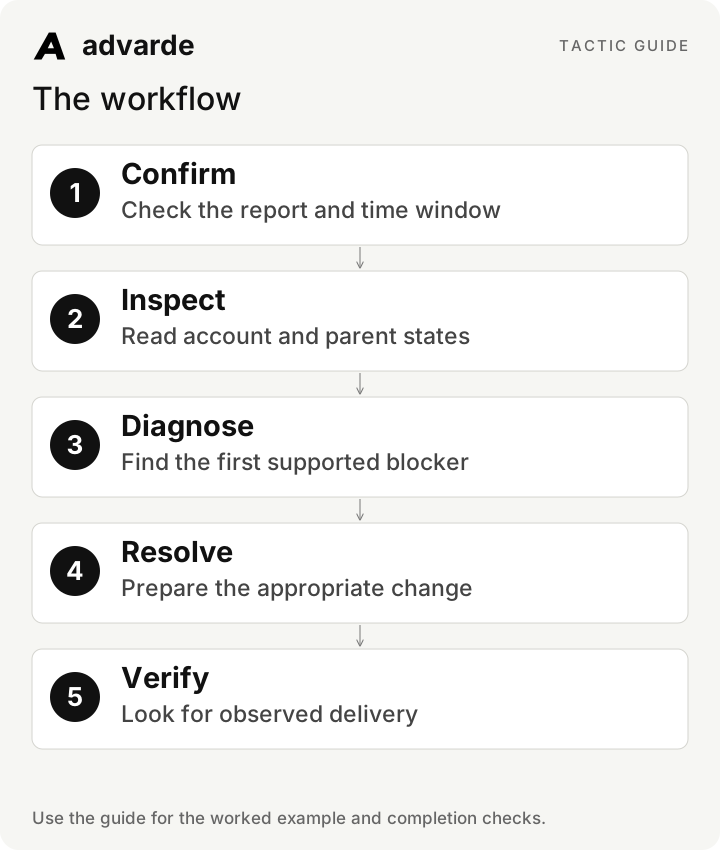
- Read access to the correct advertiser account and affected campaign.
- The launch time, timezone, and relevant resource IDs.
- Access to review status, readiness, reporting, and recent change history.
1. Confirm the observation before diagnosing it
Record whether the issue is zero spend, zero impressions, missing metrics, or a report that does not include the relevant time. These are different observations. A report for yesterday cannot establish what happened after a campaign launched today.
Check the account ID, timezone, selected dates, filters, and data availability. Give the campaign and reporting enough time for the chosen completed window and documented reporting delay. Do not use an arbitrary promise such as “every campaign must spend within an hour.”
| Observation | What to check first |
|---|---|
| Missing metrics | Access, report completeness, dates, and resource filters |
| Zero impressions in a valid window | Account, review, timing, and hierarchy state |
| Impressions but rounded or tiny spend | Raw values, currency units, and report display |
| Campaign launched after the report ended | Choose a relevant later reporting window |
2. Inspect the account and full hierarchy
Read the advertiser account’s status and review state, then the campaign, ad groups, and ads. An active child does not override a paused parent. Confirm that at least one usable ad exists and that its destination and assets are present.
Record each level separately. Do not summarize a mixed state as simply “active.” Review permissions and connection status too: a failed read can hide the relevant state without proving that the resource is disabled.
Investigate [campaign ID] in [advertiser account] using read-only checks.
First state the reporting dates, timezone, metric availability, and exact observation.
Then list account, campaign, ad group, and ad states with resource IDs.
Include review status, schedules, available ads, and known readiness blockers.
Distinguish confirmed blockers from unknowns. Do not change bids, budgets, or status.
3. Check timing and platform review
Compare account-local start and end dates with the actual intended launch time. A campaign scheduled for tomorrow has no present delivery obligation. An expired flight or launch approval window needs its own reviewed decision.
Inspect platform review status for the ads and account where available. Pending review calls for monitoring the review state. Rejection calls for addressing the stated reason and reviewing the corrected ad; it does not call for bypassing review or repeatedly duplicating the same rejected creative.
| Finding | Appropriate next step |
|---|---|
| Future start | Confirm the intended timezone and wait for the approved start |
| Flight ended | Review whether a new schedule is intended |
| Ad pending review | Track review status; keep the owner informed |
| Rejected ad | Inspect the reason and prepare a compliant revision |
| Expired launch approval | Prepare a fresh review when launch is still intended |
The first supported finding determines the next step
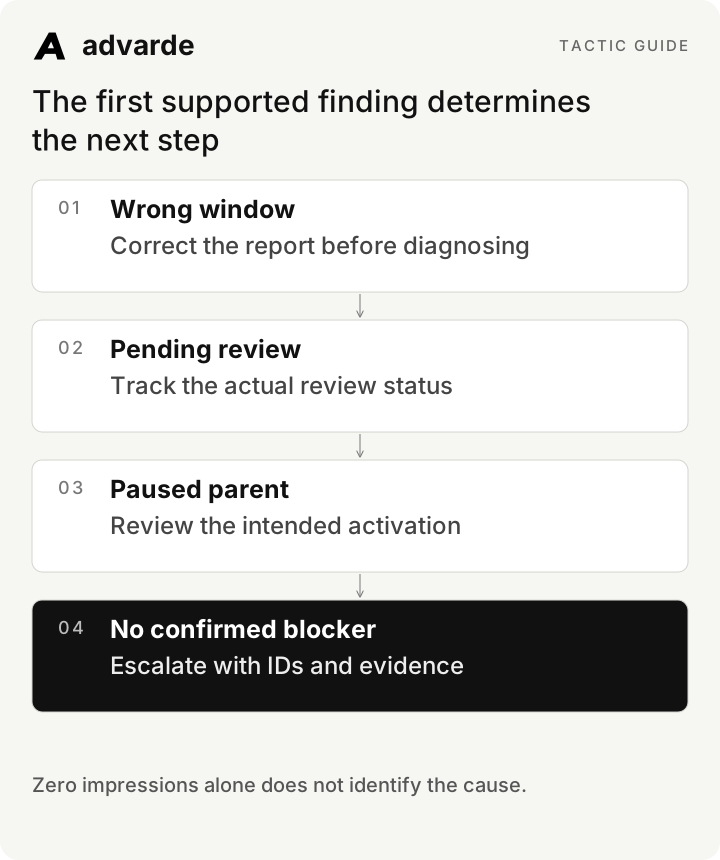
4. Read readiness and recent changes
Use Advarde’s campaign readiness and account-health information to identify supported blockers. Look at changes to dates, budgets, targeting, conversion dependencies, and parent status. An external edit may invalidate an earlier reviewed plan.
Check the recorded build or launch outcome. Created paused is an expected creation state, not a failed activation. If an operation is failed or uncertain, resolve that specific operation. Do not recreate the entire campaign simply because the chat ended before the result appeared.
5. Work through three diagnostic examples
These examples use invented account states. The point is to identify the next supported action without guessing at an auction explanation. A confirmed parent pause is a configuration finding; no visible blocker is a different outcome.
Where every inspected state is eligible but delivery remains absent, review the configured scope, bids, budgets, and offer relevance against the current account’s options. A lack of spend alone cannot tell you which factor is responsible. Prepare a scoped investigation or support escalation.
| Fictional case | Evidence | Decision |
|---|---|---|
| Paused parent | Ad active; ad group paused | Review whether activating that exact group is intended |
| Wrong reporting window | Campaign launched today; report ends yesterday | Read a relevant later completed window |
| No confirmed blocker | Hierarchy eligible; review complete; valid window has no impressions | Record settings and evidence; investigate or escalate without claiming a cause |
6. Change only what the diagnosis supports
Prepare a reviewed correction for the identified issue. If the intended launch never received authorization, complete that review. If a date was wrong, review the corrected dates. Do not pair an operational fix with a speculative bid increase unless that separate decision is justified and authorized.
Preserve before and after states and the change ID. For an uncertain write, inspect and reconcile the remote outcome before retrying. A timeout may mean the provider accepted the change but the response was lost.
Based on [diagnostic record], identify the first confirmed blocker.
Propose the smallest correction and show the exact affected resource and fields.
List required review, remaining unknowns, and expected verification evidence.
If no blocker is confirmed, prepare an escalation packet instead of guessing.
Do not apply the change or retry an uncertain operation.
7. Verify delivery and prepare a useful escalation
After a reviewed correction, verify the current resource state and read an appropriate later report. Active status confirms configuration; observed impressions support a delivery claim. Keep the report period and capture time in the record.
A useful escalation includes advertiser and campaign IDs, relevant ad IDs, launch time and timezone, review states, affected window, observed metrics, exact error or change IDs, and the checks already completed. Remove secrets and personal data. This lets the next operator investigate without repeating every basic check.
Complete the worksheet and check your work
Download the free pack and complete the three editable worksheets in order. It includes this illustrated guide and its worked-example tables so you can use the material offline. Replace the fields with your own verified inputs. The prompts work with supplied material; reading or saving Advarde records requires a compatible authorized connection.
- Zero delivery is distinguished from missing or irrelevant reporting.
- The account and all parent/child states are recorded.
- Timezone, flight dates, and platform review have been checked.
- Recent edits and saved build/launch results were inspected.
- Any proposed fix addresses a confirmed finding and receives review.
- Delivery is verified with impressions, or a precise escalation is assigned.
| Worksheet | Use it for |
|---|---|
| No-delivery diagnostic record | delivery-diagnostic.md |
| Reviewed resolution and verification | delivery-resolution.md |
| Delivery escalation packet | delivery-escalation.md |
Put this tactic to work in Advarde
Create an Advarde workspace to keep the relevant campaign context, reviewed work, and team records together. Use a connected assistant when it helps you draft or inspect the information. Start with the completed worksheet and the exact account and task you intend to manage. The guide and downloads are free; Advarde subscriptions, assistant access, and advertising spend are separate.
Common questions
Can I use the guide without an Advarde account?
Yes. The illustrated guide, examples, prompts, and editable worksheets are available without signup or an email gate. An Advarde account and appropriate access are needed to carry out the product-specific steps.
Does a prompt or worksheet authorize live changes?
No. Planning and analysis prompts prepare work for review. Changes to advertising follow the applicable account permissions and reviewed authorization. Use the actual connected tools and current account capabilities.