A campaign needs more than ad copy. It needs a clear offer, suitable assets, a reviewed budget, working measurement, and a record of what happened after launch. When those details are spread across chats and files, each new task starts with gathering them again.
The Advarde advertising system brings brand knowledge, campaign preparation, approvals, tracking, reporting, and team access into one connected workflow. Your AI assistant supplies the conversation and reasoning; Advarde provides the saved context, account tools, and operating workflows.
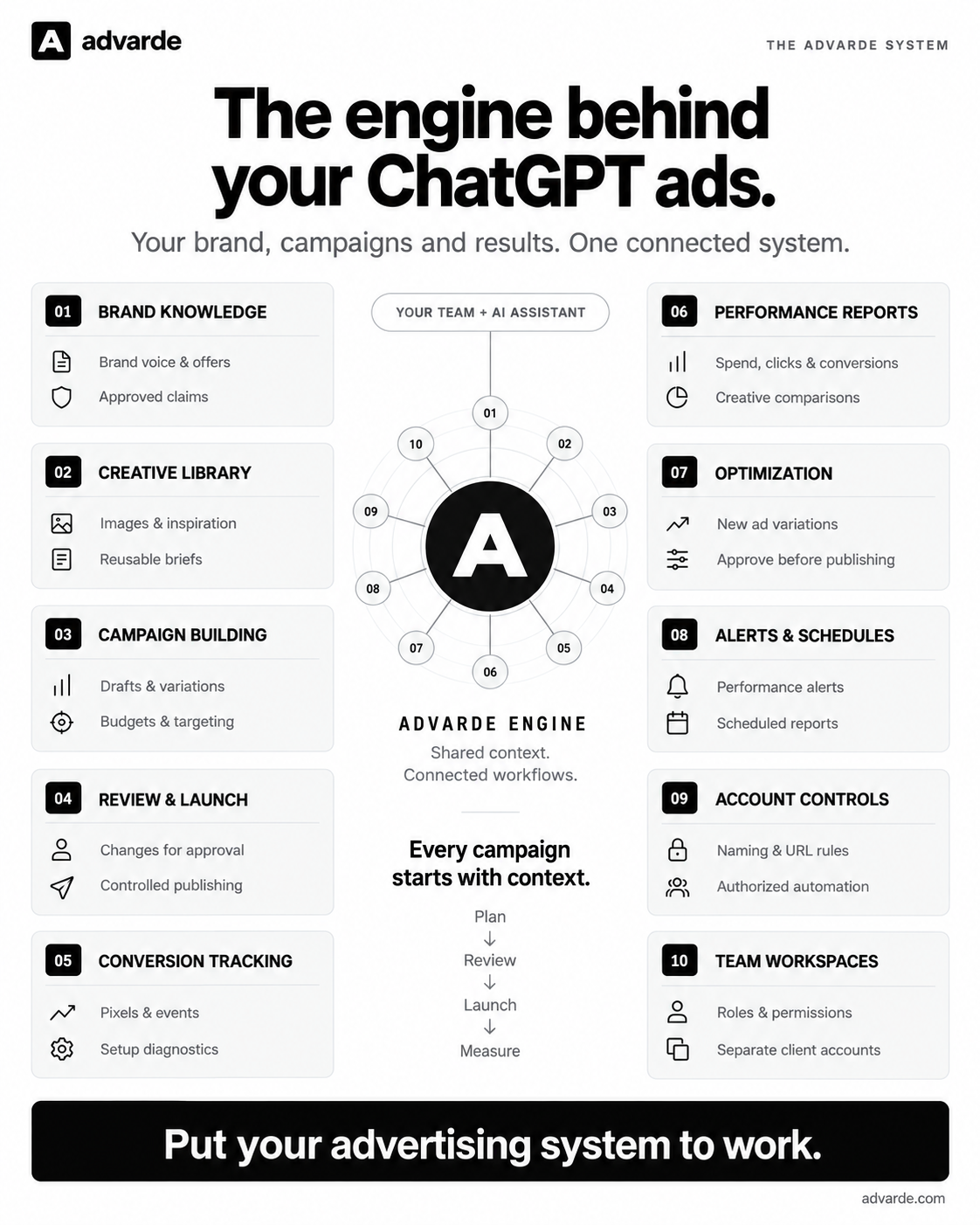
This free guide follows the ten parts in the diagram. It includes a starter prompt for each part and an editable workbook you can use to prepare your own setup. Read and download it without signing up.
Jump to a step in this guide
Start with one account and one offer
Choose the business, advertiser account, offer, destination, and customer action you want to work on. Name a person who owns the setup and someone who reviews campaign changes. You can prepare the workbook before connecting any tools.
To carry out the account workflows in Advarde, you need an Advarde workspace and an eligible OpenAI advertiser account with the required access. If you want to use the prompts against saved account data, connect a compatible AI assistant to the correct workspace first. The guide and workbook are free; Advarde subscriptions and advertising spend are separate.
- Download the workbook and fill in the account, offer, owner, and conversion action.
- Work through the ten sections. Keep unresolved questions visible instead of guessing.
- Use the starter prompts with your connected assistant, replacing every bracketed placeholder. Review the output before saving or applying it.
- Prepare one campaign, review it, launch when ready, and use the measured results to plan the next change.
The system at a glance
The ten parts share a practical sequence: plan, review, launch, and measure. Brand knowledge and assets inform the draft. Review and tracking make it ready to use. Reports and feedback inform the next proposal. Account controls and team access support the whole process.
01. Brand knowledge
Give every campaign a useful starting point: who you help, what you sell, why someone should choose it, and which claims you can support. Keep that information in a saved brand profile that your team and connected assistant can read.
Include the offer, audience, tone, approved claims, supporting links, and restrictions. Assign someone to update the profile when an offer changes. In Advarde, save and manage brand profiles through your connected assistant or the API; the browser has no standalone knowledge library. Saved context helps only when the next task actually reads it.
Finish with: A current brand profile with an owner and evidence for the claims you intend to use.
Starter prompt:
Read the saved brand context for [brand] in [workspace]. Summarize the audience, offer, voice, approved claims, evidence, and restrictions. Identify missing or conflicting information. Use only supplied facts. Draft an updated brand profile for me to review.02. Creative library
Keep images, briefs, and inspiration close to the campaign they support. Give each asset a name that identifies its offer or intended use, and record where it came from. For an outside example, save the source URL and observation date.
Upload or reuse images in the campaign builder for the selected advertiser account. Your connected assistant can save briefs, playbooks, and supplied inspiration through MCP. An observed competitor ad can suggest an approach to examine; it does not tell you how well that ad performed.
Finish with: A reusable brief and a short list of suitable assets for the selected account.
Starter prompt:
Read the brief for [offer] and list the saved campaign images for [account]. Suggest suitable assets and three creative approaches using the supplied inspiration. For each, explain the customer problem, offer, supporting evidence, and destination. Flag missing assets and unsupported claims.03. Campaign building
Turn the brief into a campaign draft with an objective, budget, locations, schedule, ad groups, and creative. Confirm the account’s currency and time zone before entering money or dates. Keep open decisions visible so someone can resolve them before creation.
Advarde keeps campaign drafts, revisions, and assets together. Start with one clear offer and a small set of meaningful variations. For example, a booking campaign might compare copy about convenience with copy about the service itself, using the same booking destination. That is a test idea, not a prediction of results.
Finish with: A saved campaign draft with a complete setup and a list of any unresolved inputs.
Starter prompt:
For [account], read [approved brief] and confirm the account currency and time zone. Prepare a campaign draft for [objective], with [budget and currency], [locations], [start and end dates], and [destination]. Use the selected assets. List missing decisions and show the full draft. Do not create or activate live advertising resources.04. Review & launch
Give the reviewer the exact version that would be applied. They should be able to see the account, creative, destinations, targeting, budget, and schedule together. A change to those details needs another review.
In Advarde’s standard campaign-building workflow, newly created resources start paused. Review the created campaign and its readiness before authorizing activation. Keep the platform’s review status and any unfinished requirements visible. An active status alone does not establish that an ad has delivered impressions.
Finish with: A recorded review of the exact campaign version, followed by a separate launch decision.
Starter prompt:
Inspect the saved draft [name or ID]. Show the exact account, objective, budget, targeting, schedule, creative, URLs, and open blockers. Prepare a review summary and explain what applying it would create or change. Keep creation and activation as separate decisions. Wait for my approval before applying changes.05. Conversion tracking
Decide which completed customer action matters: an accepted lead, a confirmed booking, or a purchase. Write down when that action actually succeeds in your website or application. A button click and a completed booking answer different questions.
Advarde provides conversion presets, installation instructions, and diagnostic checks. Choose the relevant setup, implement it on the destination, and test the successful action before relying on the measurement. Recent browser receipts help with diagnosis; they do not by themselves prove advertising attribution.
Finish with: A defined conversion action, an installation owner, and a record of what was tested.
Starter prompt:
For [website] and [account], inspect the saved conversion setup. Our desired outcome is [completed customer action]. Recommend the matching setup and describe the successful-action trigger, installation work, and test steps. Separate what is configured, what is installed, and what has been verified. Prepare instructions for review.06. Performance reports
Review results for a stated account and completed date range. Start with spend, impressions, clicks, and available conversions. Compare with a preceding period of equal length, and explain what changed before proposing what to do next.
Advarde can join reports with saved hook and offer labels so creative comparisons retain their context. Show missing conversion data as unknown. Keep the reporting period and conversion definition with the numbers, and avoid presenting an observed difference as proof that one creative caused an improvement.
Finish with: A report with a clear period, consistent definitions, and a short list of next decisions.
Starter prompt:
Create a report for [account] covering [completed start date] through [completed end date] in the account time zone. Compare with the preceding equal-length period. Include spend, impressions, clicks, available conversions, and creative comparisons where labels exist. Show missing data explicitly. Summarize observations, possible explanations, and decisions separately.07. Optimization
Use campaign evidence to decide what is worth trying next. Keep the original ad, proposed variation, supporting observation, and test idea together so the reviewer can understand the proposed change.
The optional Campaign optimizer is off by default and requires Advarde superadmin enablement for your workspace. If enabled, it lets a connected AI agent propose new ad variations for selected existing campaigns. Your team reviews them in the approval inbox before publishing. Recurring AI reviews also require a scheduled task in a compatible assistant host. Setting a cadence in Advarde alone does not create that external task. When the evidence is insufficient, waiting is a valid decision.
Finish with: A reviewable ad variation with a stated reason to test it, or a clear decision to wait.
Starter prompt:
Read the available optimization evidence, brand context, prior proposals, and feedback for [selected campaigns]. Propose a new ad variation only if the evidence supports a useful test. Include the original ad, proposed copy, destination, hypothesis, and supporting observations. Otherwise explain why to wait. Submit the proposal for review; do not publish it.08. Alerts & schedules
Decide which changes deserve attention and who will review them. Useful starting points include a spend threshold, no delivery on a selected active campaign, a change in click-through rate, and an ad’s review status.
Advarde can run scheduled reports and configured alert checks on its server. Choose the account, period, threshold, cadence, and owner deliberately. These monitoring schedules do not change campaigns. They are also separate from the assistant-host task used for recurring optimization reviews.
Finish with: A defined reporting routine and a small set of alerts with named owners.
Starter prompt:
Draft a monitoring plan for [account]: a [daily, weekly, or monthly] report and alerts for [specific conditions]. State each threshold, comparison period, minimum evidence, cadence, and owner. Explain which checks use Advarde schedules. Show the plan before enabling any schedule or notification.09. Account controls
Write down how the account should be operated: campaign naming, allowed destinations, tracking URL conventions, and who can approve changes. Consistent standards make the next draft easier to review.
Use account write permissions, team roles, and a reviewed proposal for each campaign change. A report or alert does not authorize a budget change. Record your operating conventions in the campaign brief so your team can review them alongside the proposed settings.
Finish with: A short operating standard and a clear review process for campaign changes.
Starter prompt:
Inspect the account permissions for [account]. Draft naming rules, allowed destination domains, and tracking URL defaults from [approved requirements]. Identify conflicts with existing settings and save the proposed conventions in a brief for review. Do not modify live campaigns.10. Team workspaces
Give each person the access their role needs and make the current client or business visible throughout the workflow. EARLYBIRD includes one connected ad account and five seats. For several clients or brands, contact Advarde to confirm capacity and access before planning separate client workspaces.
Record the owner, campaign preparer, reviewer, reporting owner, and connected assistants. Use Advarde’s roles and connection controls to manage access. Include access removal in handover and offboarding so an old team member or assistant connection does not remain part of the process accidentally.
Finish with: A workspace and access plan that makes ownership, review, and client boundaries clear.
Starter prompt:
Inspect the members, account connections, and assistant connections in [workspace]. Summarize who can prepare work, review it, and apply changes. Draft an access and handover plan for [team or client]. Flag unnecessary access and missing owners. Keep other clients in separate workspaces and show proposed access changes for review.Keep the workflow useful after the first launch
Return to the saved context when the offer, audience, destination, or evidence changes. Keep the report and the next creative proposal connected to the same campaign and account. Record what you decided and why so the next reviewer has the reasoning as well as the latest copy.
For a new campaign, start with the brief and measurement setup. For an existing campaign, begin with a report and review the context before proposing changes. Add report schedules only when you have defined the work they should do.
- Before launch: review the brief, campaign settings, destination, conversion setup, and launch decision.
- After launch: check delivery and measurement evidence, then review a completed reporting period.
- At each review: record observations, missing evidence, the next test, or a decision to wait.
- When people or offers change: update the saved context and review access and responsibilities.
Put your setup into Advarde
Use the completed workbook as the brief for your workspace. Save the brand profile and assets, connect the correct account, assign access, and prepare the first campaign for review. Your team can work in the browser or through a compatible connected assistant.
Choose a plan that fits your team and accounts. The free guide remains available whether or not you use Advarde.
Common questions
What is included for free?
The complete guide, ten starter prompts, and the editable Markdown setup workbook. No email address or signup is required to read or download them. Advarde subscriptions and advertising spend are separate.
Can I use the workbook before I have an advertiser account?
Yes. You can prepare the offer, brand context, creative brief, review process, and measurement plan first. Operating campaigns still requires an eligible OpenAI advertiser account and the appropriate access.
Does Advarde provide its own AI model?
Your connected assistant provides the reasoning and drafted copy. Advarde supplies the workspace, saved marketing context, advertising tools, and review workflows. The starter prompts need a compatible connection to inspect your Advarde data.
Do reports and optimization run the same way?
No. Configured reports and monitoring checks run through Advarde schedules. Recurring AI optimization reviews also require a scheduled task in a compatible assistant host. Check that the assistant task has actually been created and is running.