
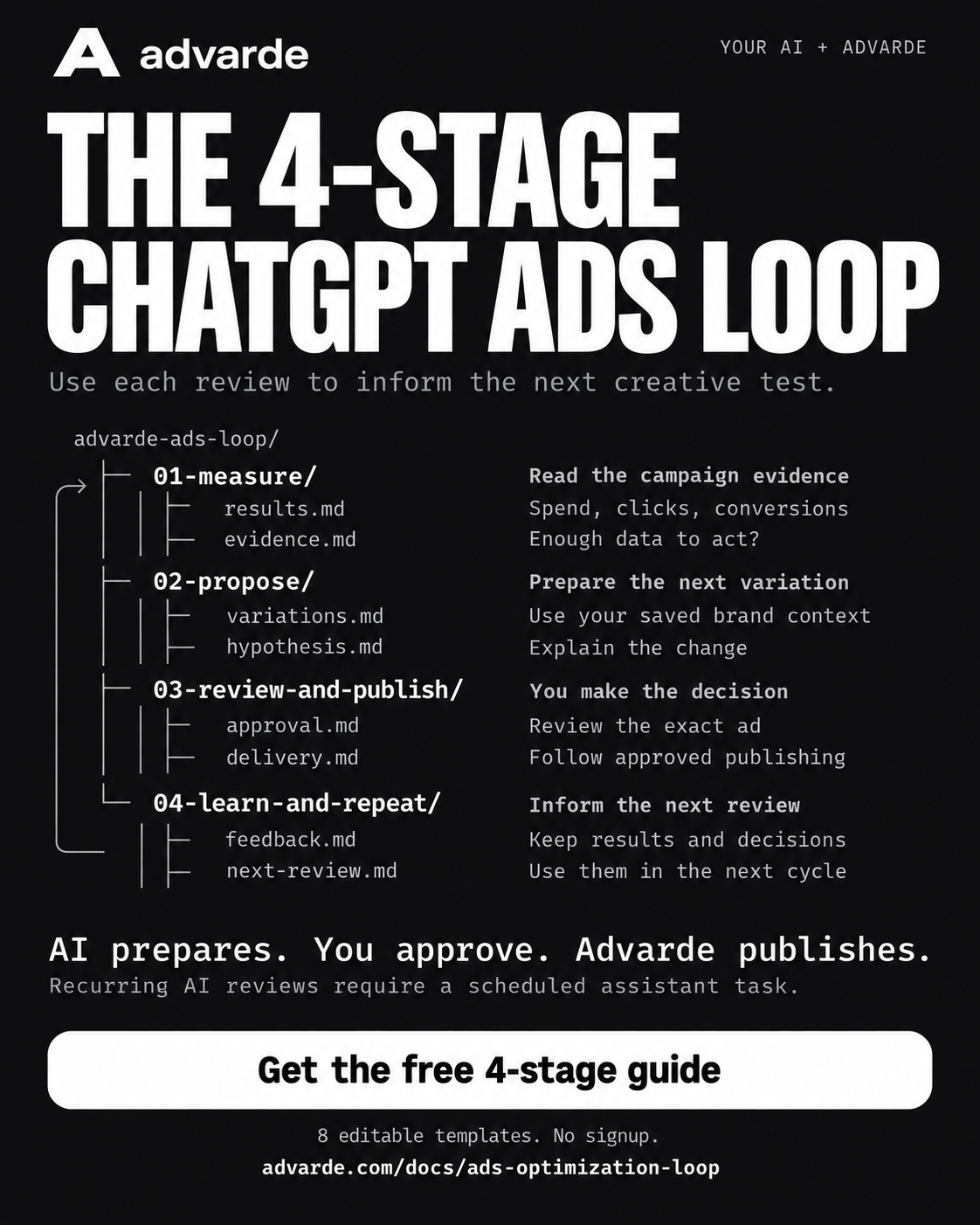
Your next ad variation should start with the campaign evidence and the decisions already made. The four-stage Advarde workflow connects those inputs: measure, propose, review and publish, then use the results and feedback in the next review.
The Campaign optimizer is off by default and requires Advarde superadmin enablement for your workspace. Workspace owners cannot enable the feature themselves. Once enabled, Claude or another compatible connected assistant reads the evidence and prepares proposals. Your team approves the exact ads in Advarde. Advarde then manages the approved publishing work. Recurring AI reviews require a working scheduled task in the assistant host.
This guide and its eight editable templates are free, with no signup or email gate. Advarde subscriptions and advertising spend are separate.
Jump to a step in this guide
Start with existing campaigns and a clear goal
This workflow prepares new standard chat-card variations inside selected existing campaigns and ad groups. It keeps existing ads, campaign budgets, bids, and targeting unchanged. Choose active campaigns with eligible approved ads, a defined goal, and enough reliable evidence for a useful review.
Use the Campaign optimizer in Advarde to select an account and campaigns. Choose CPC, CPA, or CTR to match the decision you want to make. For CPA, select the relevant conversion goal and make sure conversion data is available. Save the brand brief, approved claims, and allowed destination domains before asking for new copy.
If you are preparing your first campaign, use the launch guide first. This cycle starts once there are eligible ads and campaign evidence to review.
The four stages at a glance
Each cycle connects an evidence review to a specific proposal, an approval decision, and later results. The last stage makes the history available to the next review. It does not guarantee that every cycle will produce a better ad, and some reviews should end without a new proposal.
01. Measure the campaign evidence
Read the completed performance period, selected goal, eligible base ads, and saved brand context. Record spend, impressions, clicks, and available conversions with their dates and account. A high click-through rate answers a different question from a low cost per conversion.
Advarde captures the evidence for a claimed review and gives the assistant the configured requirements. Missing conversions, incomplete evidence, or a sample below the configured minimum can justify waiting. A configured threshold is an operating rule; passing it does not prove statistical significance.
Use results.md to record the facts and evidence.md to decide whether a proposal is warranted.
Read the evidence for optimization review [review ID].
State the account, reporting period, selected goal, eligible ads, and available metrics.
Check the configured evidence minimums and identify missing data.
Explain whether to propose a creative test, wait, or investigate.
02. Propose the next variation
Use an eligible base ad, the approved brand context, and a specific observation to prepare new copy. Include a reason for the change and a hypothesis the reviewer can assess. Keep the current ad and proposed ad side by side.
For example, the assistant might propose explaining the booking process more clearly after reviewing campaign evidence and a saved brief about customer hesitation. The evidence supports considering a test; it does not establish that the new copy will improve results.
The proposal identifies the base ad, copy, destination, and image choice. It can reuse the base ad’s uploaded image or use a suitable image already saved for the account. Save the variation and its hypothesis for review.
Use review [review ID], its eligible base ads, saved brand context, and prior feedback.
Prepare a new ad variation only if a useful test is supported.
Include the base ad ID, proposed copy, destination, image choice, and hypothesis.
Submit the proposal for review. Do not publish or change budgets, bids, or targeting.
03. Review and publish the exact ad
Open the proposal in Advarde’s Approval inbox. Compare the original and proposed creative, the evidence, the hypothesis, and the destination. You can edit the copy, request changes, reject the idea, or approve selected ads.
An authorized workspace owner or admin uses Approve and publish in the dashboard. The review displays the exact revisions, existing campaign budget, destination, and activation window. That decision authorizes creation and conditional activation of those ads after the platform’s review and the remaining checks. The assistant does not make this approval decision through MCP.
Publishing then continues on Advarde’s server. New ads are created paused, checked through platform review, and activated only while the approval and its conditions remain valid. Keep created ad IDs and publishing status with the proposal. Active status alone is not evidence of delivery; later observed impressions establish that an ad has started delivering.
Summarize proposal [proposal ID] for my review.
Show its exact revision, account, original and new copy, destination, image, evidence,
hypothesis, existing campaign budget, and activation window.
Flag unresolved questions. I will approve or request changes in Advarde.
04. Use results and feedback in the next review
The next review receives prior proposals, hypotheses, reviewer feedback, published ad IDs, and the latest measured results. This lets the assistant account for an idea you rejected, a claim you corrected, or a variation that has begun collecting evidence.
That is the practical meaning of learning here: using saved history in the next decision. It does not mean Advarde trains its own model or that performance improves on every run. Observed comparisons can suggest another test without proving that a copy change caused a result.
Record the feedback and the next evidence check. Pending approvals, publishing work, or uncertain results can hold the next proposal cycle. Complete or resolve that work instead of creating another version around it.
Read the previous proposals, feedback, published ad IDs, and latest results for [optimizer].
Explain what the next review should retain, reconsider, or wait to measure.
Check for pending approvals or publishing holds.
Use that history in the next due review and state uncertainty explicitly.
Set up the recurring assistant task
There are two parts to the schedule. Advarde determines when a review is due. A compatible assistant host must also run a recurring task that checks for that work and processes it. Setting a cadence in Advarde does not create the assistant task.
Advarde’s generated Agent setup instructions ask the host to check for due reviews hourly. The optimizer’s cadence determines whether there is work to do. For example, a 72-hour review cadence can still use an hourly check; that does not mean a new proposal should be generated every hour.
Use the instructions generated for your actual optimizer. Scheduling availability, unattended tool permissions, and whether a local computer must remain on depend on the host. If your setup cannot run recurring tasks reliably, use Review now and process the queued work during an active assistant session.
- Create the optimizer as an authorized workspace owner or admin and select its account and campaigns.
- Set the goal, reporting delay, evidence minimums, review cadence, allowed domains, and brand instructions.
- Open Agent setup and copy the generated instructions into the assistant that has the correct Advarde connection.
- Ask that host to save a recurring task with the required access to read evidence and save proposals.
- Confirm the host saved the task and check its next run. Do not treat an acknowledgement as proof that a schedule exists.
- Run an initial check and verify Agent last seen and Review history in Advarde.
- Assign a reviewer for the approval inbox and a person to investigate a failed or stopped task.
What runs when you close the chat
Check the responsibility for each stage before depending on unattended operation. Closing a conversation does not turn an unsaved prompt into a recurring task.
| Work | Who performs it | What must remain true |
|---|---|---|
| Queue due reviews | Advarde server | The optimizer is enabled and its configuration is valid. |
| Read evidence and prepare proposals | Your connected assistant host | Its recurring task runs with the required connection and tool access. Local hosts may need an active computer and application. |
| Approve exact ads | An authorized person in Advarde | The reviewer approves the displayed revision and publishing window. |
| Create and conditionally activate approved ads | Advarde server | Approval, platform review, account access, unchanged active parents, and the execution deadline still permit it. |
| Use later results and feedback | The next assistant review | New evidence is available and unresolved approval or publishing work does not hold the cycle. |
An illustrative four-week example
Imagine a booking business with two eligible ads and a saved brief. Its first creative idea emphasizes convenience. Over the following reviews, the team considers whether explaining what happens during the appointment would be more useful.
This is a fictional walkthrough, not a customer result or a performance forecast. The weeks illustrate decisions, not a promised timetable for collecting enough data. Every comparison still needs a consistent goal, period, and reliable measurement.
| Review | Evidence and feedback | Decision |
|---|---|---|
| Week 1 | Few conversions are available, and the configured evidence minimum is not met. | Record insufficient evidence. Keep the current ads and wait. |
| Week 2 | The review now has enough evidence to consider a test. The team’s brief identifies uncertainty about the appointment process. | Propose copy that explains the first appointment. State the hypothesis and request review. |
| Week 3 | The reviewer removes an unsupported promise and approves the revised copy. The new ad is created and begins collecting evidence after platform review and activation. | Retain the correction and resulting ad ID. Give the variation time to collect a useful completed reporting period. |
| Week 4 | The review has the original hypothesis, the reviewer’s correction, and the available results for the new ad. | Compare the evidence and consider a more specific appointment description if warranted. Keep waiting if the results remain inconclusive. |
Use the eight editable templates
The download contains the four folders shown below, with two Markdown templates in each. Every template includes fill-in fields, a starter prompt, and completion checks. A README and a separate scheduling checklist explain how to use them.
These are planning and review documents. Downloading them does not install a skill, create an optimizer, schedule an assistant, or authorize advertising changes. Use them with the guide and your actual Agent setup instructions.
advarde-ads-loop/
├── 01-measure/
│   ├── results.md
│   └── evidence.md
├── 02-propose/
│   ├── variations.md
│   └── hypothesis.md
├── 03-review-and-publish/
│   ├── approval.md
│   └── delivery.md
└── 04-learn-and-repeat/
    ├── feedback.md
    └── next-review.md
Check the first run and know how to stop
For the first run, verify that the correct assistant has been seen, a review was claimed and completed, and the result is a proposal or a clear no-change outcome. Inspect the approval inbox before expecting publishing work. After approving a proposal, follow its build status and later delivery evidence.
If a publish result is uncertain, use Inspect build & reconcile instead of blindly creating another ad. Editing or pausing an optimizer cancels undispatched work and revokes pending proposals, but it does not pause ads already delivering. Stopping live advertising requires the appropriate campaign or ad pause operation.
Begin with one optimizer and a named reviewer. Add recurring work once the first review and approval process are working as intended.
Common questions
Can Claude approve and publish the ads itself?
In this optimizer workflow, a workspace owner or admin approves the exact ads in Advarde’s dashboard. The connected assistant prepares proposals and can inspect progress. Advarde handles approved creation and conditional activation.
Does the cycle change budgets or targeting?
This creative optimization workflow creates new variations within selected existing campaigns and ad groups. It preserves existing ads, budgets, bids, and targeting. Other account changes require their own workflow and authorization.
Does each review automatically find a better ad?
No. The next review uses saved evidence, proposals, and feedback. It may propose a useful test, find insufficient evidence, or recommend no change. A higher observed metric does not by itself prove causal improvement.
What can I use for free?
The complete guide, eight editable Markdown templates, and scheduling checklist are free without signing up. Advarde subscriptions, advertiser access, and any assistant plan requirements are separate.