ChatGPT Ads Manager — also called OpenAI Ads Manager — is the beta interface for creating and managing ChatGPT ads campaigns. Start at ads.openai.com, complete account and billing setup, then build campaign → ad groups → ads. Country self-service availability is listed separately from account creation.
This page is a practical checklist with OpenAI Help sources (checked 23 October 2026). Screenshots below are OpenAI’s published help images, not Advarde campaign results.
1. Account and billing
Sign in at ads.openai.com. OpenAI documents two paths: draft a first ad from a website URL during signup, or skip into Ads Manager and create campaigns later. Complete billing before expecting delivery. Review Account Name, Brand Name, and Legal Name; country, currency, and time zone cannot be changed after creation.
- Open ads.openai.com → Login or Sign up.
- Choose website-assisted signup or skip to Ads Manager.
- Enter advertiser details; finish billing and required reviews.
- Invite teammates (Admin / Member / Viewer) if needed.
2. Campaign, targeting, and ads
Create a campaign with objective, budget, locations, and schedule. Add ad groups with context hints. Create ads (title, description, image, destination). Confirm review status before spending.
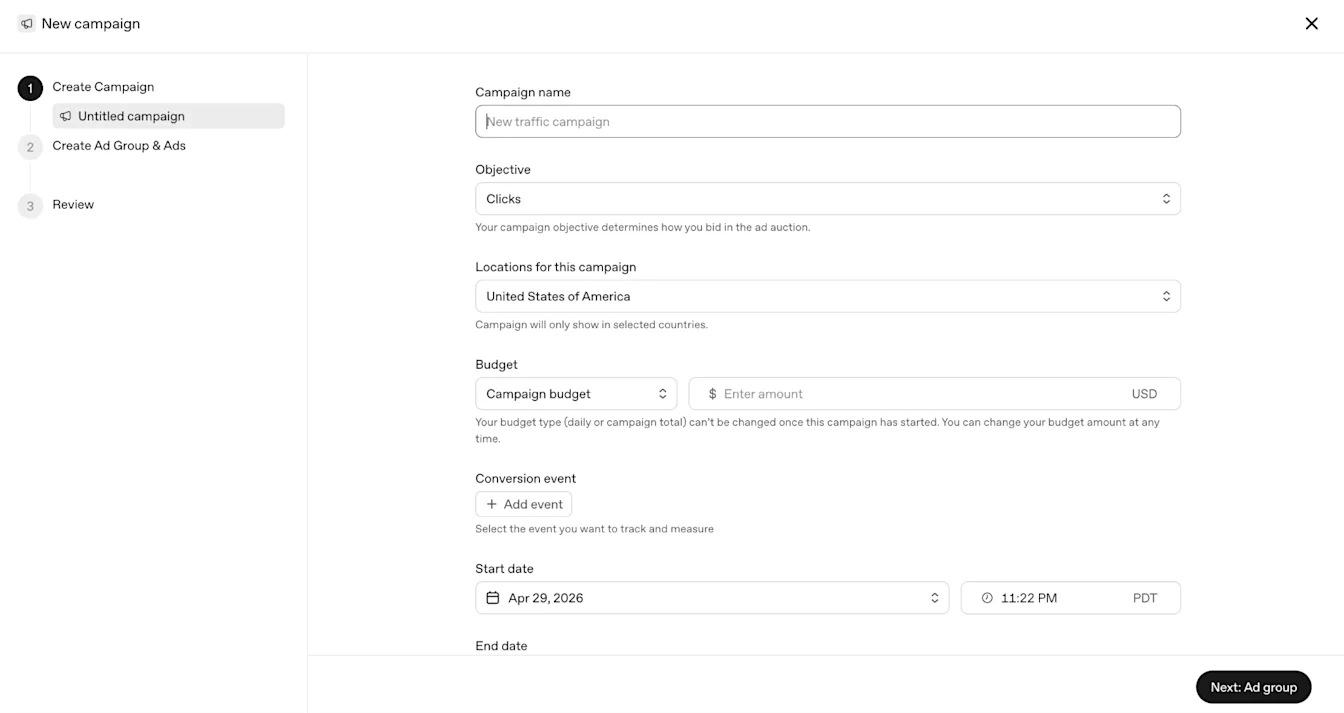
- Choose Views (CPM), Clicks (CPC), or Conversions (oCPC/oCPM where available).
- Set daily or campaign-total budget; respect currency minima.
- Select eligible countries/locations and optional platforms.
- Add ad groups and context hints for the buying situations you support.
- Upload creative that meets published specs; submit for review.
Setup checklist
Use this list before you authorize spend.
- Legal entity country is listed as self-service available (or you have partner/sales access).
- Billing is complete; currency and time zone are correct.
- Objective and budget type match the test you intend to run.
- Locations include a country your account can advertise in.
- Creative meets specs; destination loads; measurement is tested if you need outcomes.
- Campaign/ad status and review are checked after publish.
Common questions
What is ChatGPT Ads Manager?
It is OpenAI’s Ads Manager Beta — the interface for creating, launching, and managing ChatGPT ads. Access starts at ads.openai.com.
Is OpenAI Ads Manager the same thing?
Yes. Advertisers and docs use “ChatGPT Ads Manager” and “OpenAI Ads Manager” for the same beta product.
Can every country use self-service?
No. Self-service depends on the legal entity’s country appearing as available on OpenAI’s Ads Manager availability list. You can still sign up to be notified when your country opens.
Sources and verification
Setup steps checked 23 October 2026 against OpenAI Ads Manager help articles. Screenshots are OpenAI-published help assets. Your account may expose a different set of features. Examples are illustrative unless a dataset is explicitly supplied.